Report settings
Turn Ask with AI on or off, set per-person and monthly limits, record the owner acknowledgement, and see this month's usage.
Overview
The Reports admin page controls Ask with AI — letting people ask for a report in plain English — and keeps its cost predictable. It does not create or edit reports; that happens in the Reporting area.
Where it lives
Route: /admin/settings/reports
Open Admin → Data → Reports. Requires settings.manage.
Ask with AI
| Control | Behaviour |
|---|---|
| Readiness | The top of the page lists the four things Ask needs, in order: an AI (text) provider (with a Set up AI (text) link to the AI (text) tab on Integrations), an owner acknowledgement, the on switch, and at least one role with the permission. The badge reads Ready, Not ready with the steps left, or Paused — budget reached. |
| Allow people to ask for reports | Turns Ask on. It can only be turned on once an AI (text) provider and API key are configured. |
| Owner acknowledgement | Ask stays paused until an owner acknowledges what is shared, what is never shared and who pays (Acknowledge Data Sharing). The page records who acknowledged and when. Only an owner can acknowledge; managers see which owners to ask. Withdraw Acknowledgement asks for confirmation, then pauses Ask for everyone. If what is sent changes, the page asks for a fresh acknowledgement. |
On self-hosted installs, calls are billed to your own provider account. On Signals Cloud the provider account is managed by Signals.
Limits
| Field | Default | Notes |
|---|---|---|
| Questions per person per hour | 20 | 1 – 10,000 |
| Monthly token budget | No limit | When the budget is reached, Ask pauses for everyone until next month. Leave blank for no limit. |
Click Save Changes to save the settings.
Provider configuration
The ai_text settings group is configured after setup in Admin > Preferences > Integrations > AI (text). Each provider, model and key is read from SIGNALS_REPORTS_AI_PROVIDER, SIGNALS_REPORTS_AI_MODEL and SIGNALS_REPORTS_AI_KEY first. Self-hosted installations fall back to these settings and then defaults; cloud uses environment configuration and ignores stored settings. This configuration is separate from embeddings. The key is encrypted in settings and write-only in the UI.
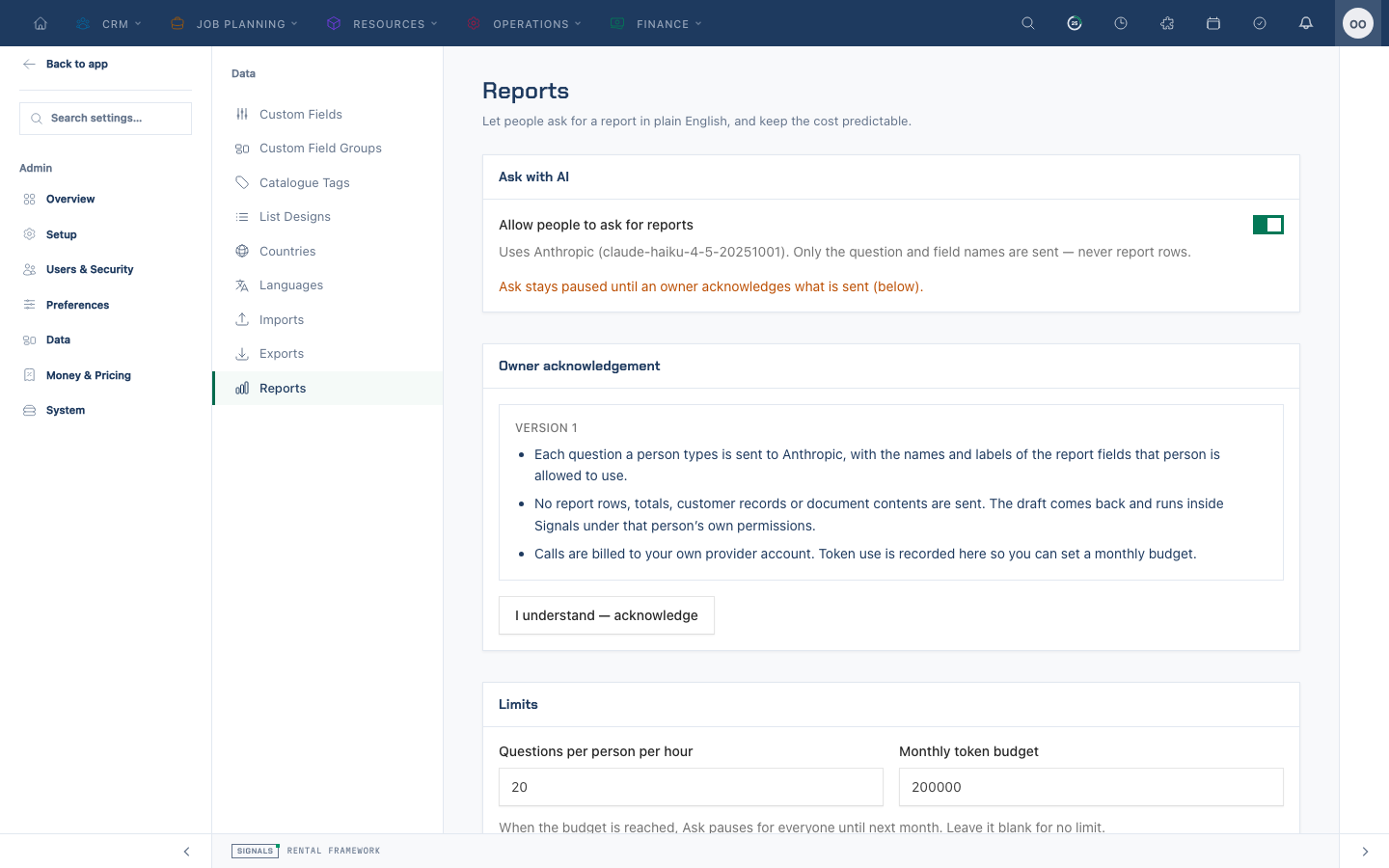
Admin > Data > Reports controls Ask, the per-user hourly limit (20 by default), optional monthly token budget, usage and roles. An owner must acknowledge the current disclosure version; withdrawing it pauses Ask. reports.ask and reports.view, enabled and configured AI, current acknowledgement, hourly capacity and remaining monthly budget are checked before a call. Ask is hidden when disabled, unconfigured, unacknowledged or unauthorized; a rate or budget pause remains visible with an explanation.
To exercise the real structured-output provider integration, run php artisan signals:reports:ai-check --provider=all (or openai, anthropic, xai). Set SIGNALS_REPORTS_AI_CHECK_OPENAI_KEY, SIGNALS_REPORTS_AI_CHECK_ANTHROPIC_KEY and SIGNALS_REPORTS_AI_CHECK_XAI_KEY for the respective providers. A missing check key falls back to the configured key for the matching provider; providers without keys are reported as skipped. This makes live provider calls and may incur charges.
System reports and the seeder
The thirty-four system reports are keyed and re-seeded by the report seeder, so a deleted or edited system report is restored on the next seeder run. See Seeders for the full list of seeded data.
Usage this month
Shows Tokens used, Questions answered, the Hourly limit (per person), Monthly budget used, and the people who asked most this month.
Who can ask
People need the Ask for Reports permission (reports.ask); owners always can. The panel lists the roles that hold it, with a Manage roles link to Roles & permissions.
Settings
| Setting | Type | Default |
|---|---|---|
reports.ask_enabled | boolean | null |
reports.ask_hourly_limit | integer | 20 |
reports.ask_monthly_token_budget | integer | null |
reports.ai_acknowledged_version | integer | null |
reports.ai_acknowledged_by | integer | null |
reports.ai_acknowledged_at | string | null |
Related
- Reporting
- Integrations — AI (text) provider