Rentals
Quote, order, and fulfil rental jobs — the rental lifecycle, line-item editor, quote versioning, and state transitions.
Overview
A rental is the central document of a rental job — it begins as an enquiry, becomes a quote, and then becomes a confirmed order that is allocated, dispatched, and returned. Every rental carries a customer, a warehouse, dates, line items, costs, and a running set of totals, and records its full history as an event stream so nothing is ever lost.
Rentals use a two-axis model: a high-level state (Enquiry → Quote → Order) and a per-state status (for example Quote/Held or Order/On Hire). The platform UI drives the same action classes the Rentals API uses, so the web and API paths stay in lock-step — validation, authorisation, audit logging, and rental.* webhooks apply identically wherever a change originates.
Route: /rentals
Rentals live under the Job Planning section of the main navigation, gated on the rentals.access permission. Opening a rental page also requires permission to view that rental and access to its warehouse. These checks are repeated on interactive requests, including archived rental views.
The Lifecycle
A rental moves through three states, each with its own set of statuses:
| State | Statuses |
|---|---|
| Enquiry | Unconfirmed |
| Quote | Pencilled, Held, Lost, Expired, Postponed |
| Order | Active, Dispatched, On Hire, Returned, Checked, Complete, Cancelled |
Those thirteen are the built-in statuses. Operators can add their own under Admin → Setup → Branding, each deriving from a built-in status in the same state and carrying its own colour; custom statuses appear in Change status and on diary cards alongside the built-ins. See Branding.
The API returns string state and status identities. Use the labels lookup for built-in display text, or the status catalogue for current tenant labels. Custom status identities remain stable when their labels change. Rental participants can be included in rental responses and managed through the participants endpoints.
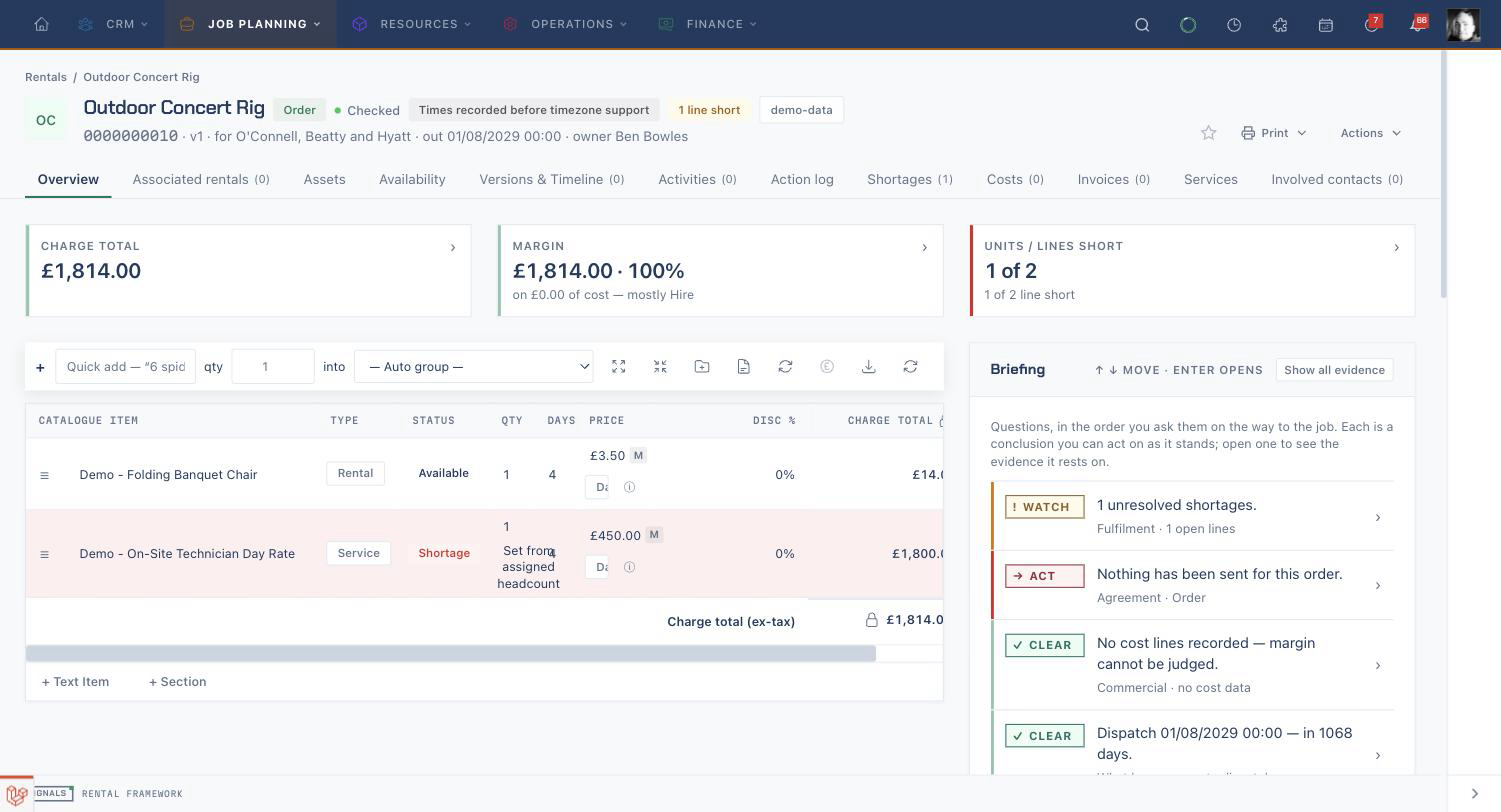
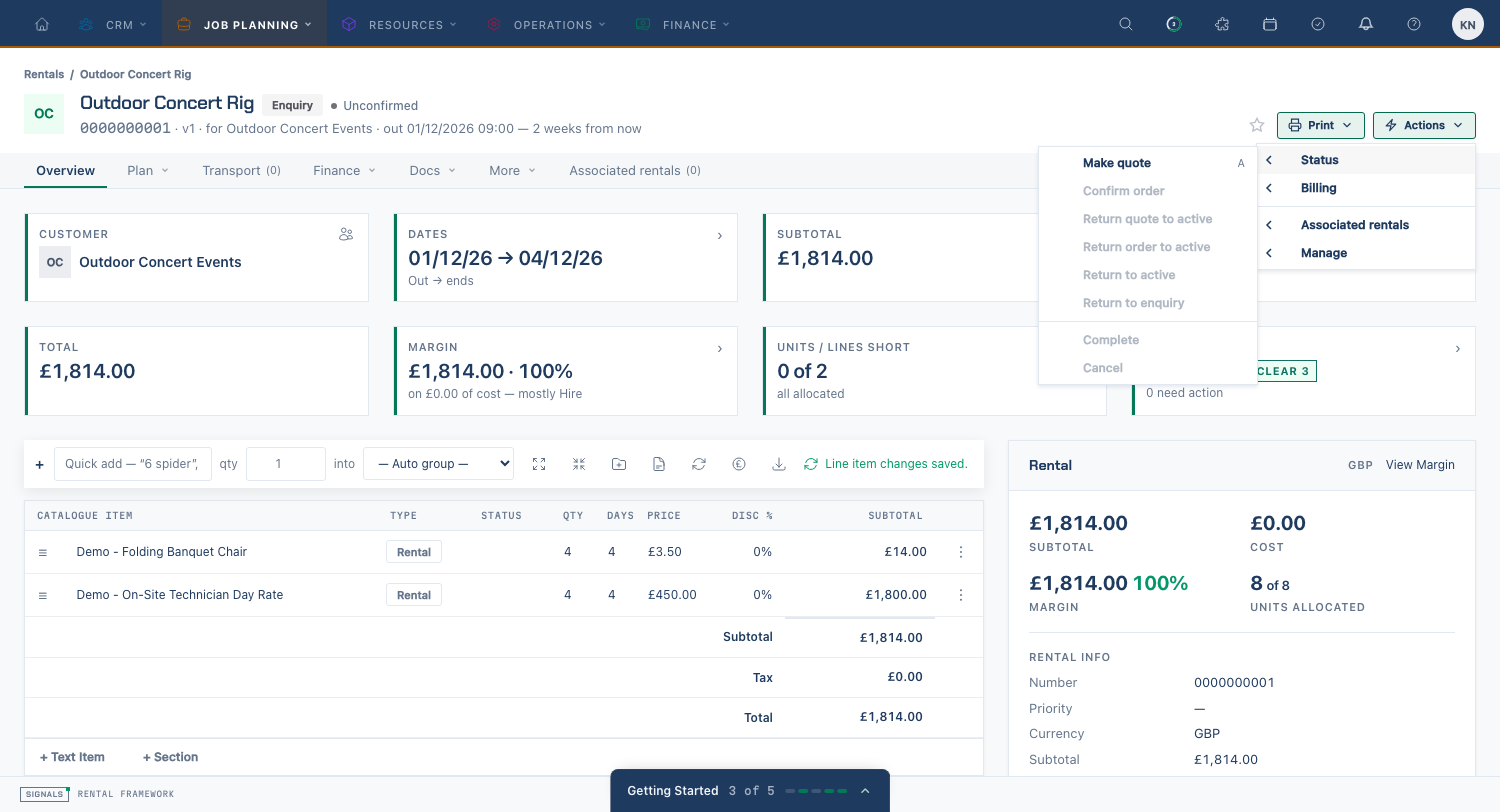
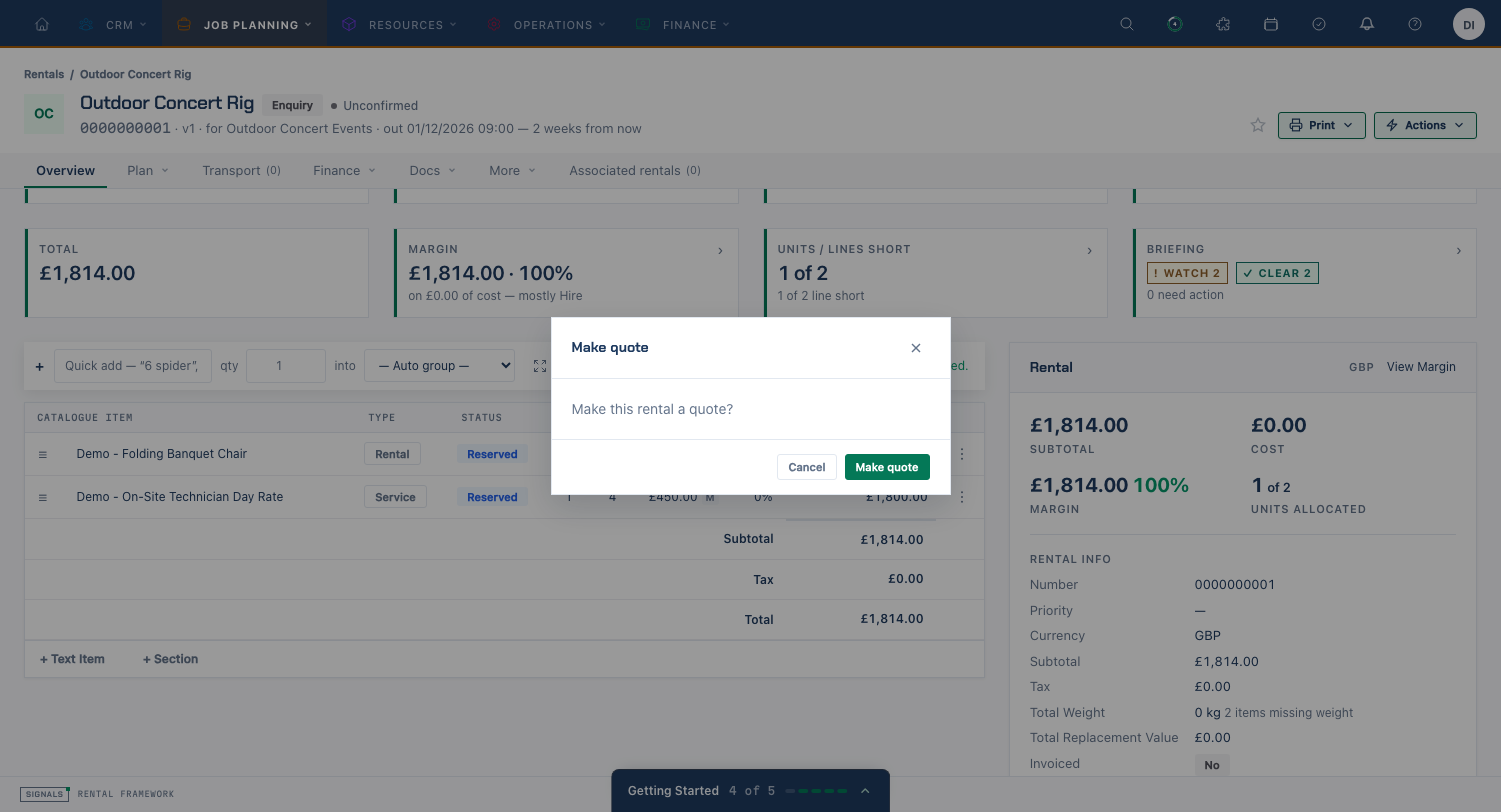
A new rental starts as an Enquiry. You build it up — add the customer, dates, and line items — then choose Make quote to prepare it for the customer. Once accepted, choose Confirm order, at which point its equipment is committed and can be allocated, dispatched, and returned. The state and status are shown as badges in the page header throughout.
State-transition actions
The transition controls live in Actions → Status in the identity-band header. The page and API use the same current-row preflight engine to report allowed actions and refusal reasons. A preview can become stale; the later command rechecks current permissions and domain rules before changing the rental.
Command-level detail — expected versions, lock timeouts, warehouse re-authorisation and the error codes each refusal returns — is in Rental API contracts.
| Action | Moves | Notes |
|---|---|---|
| Make quote | Enquiry → Quote | Promotes a draft into a sendable quote. |
| Confirm order | Quote → Order | Commits the job. Gated by the warehouse's shortage policy — a short order may be blocked, warned, or allowed. |
| Return quote to active / Return order to active / Return to active | Lost / Expired / Postponed / Cancelled / Complete → active | Returns a closed rental to its active status. |
| Make quote | Order → Quote | Only for an open order with no dispatched assets — an order that has equipment out cannot be reverted. |
| Complete | Order → Complete | Only for an open order. Offers an opt-in cascade over open descendants (see Associated Rentals). |
| Cancel | Open quote → Lost; open order → Cancelled | Only for an open quote or order. Offers the same opt-in descendant cascade. |
| Create associated rental | — | Creates a child rental. Requires rentals.create; refused on a lost, expired, or cancelled parent. |
| Extend into associated rental | — | Creates a child and copies fresh line items into it. Same permission and preconditions. |
| Unlock Rates | — | Releases the FX and tax locks (see FX & tax locks). |
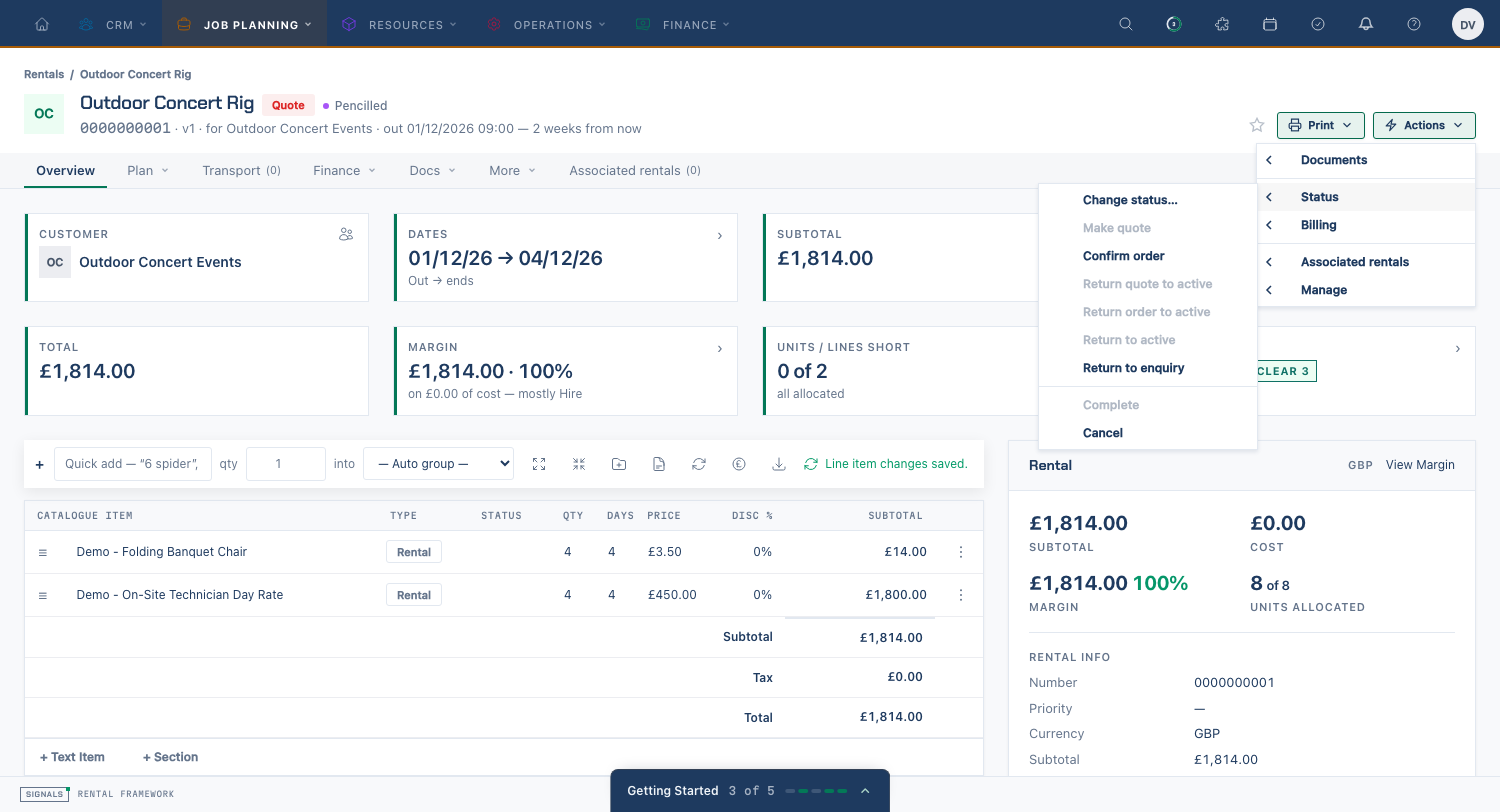
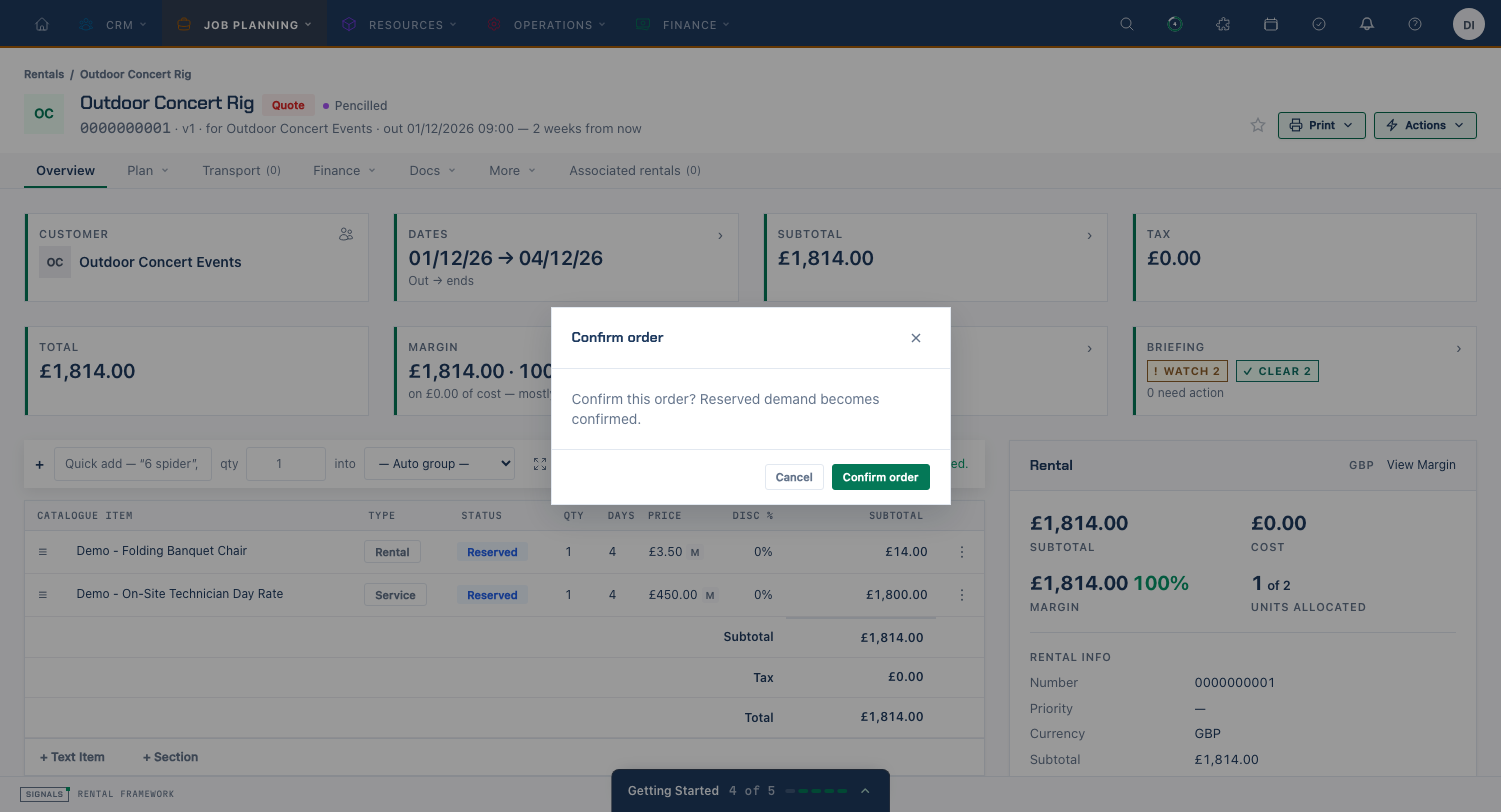
Within a state you can also change status (for example mark a quote Held or complete an eligible order) without changing the overall state. Dispatched, On Hire, Returned and Checked are derived from fulfilment evidence and cannot be selected manually. The rendered status picker submits its previewed aggregate version and document state with the choice. A changed version is refused; review the refreshed choices before trying again. API and MCP callers should likewise send the rental's expected_version with a status command.
If a change is refused because the rental changed underneath you, reload it, review the current customer, lines and version, and try again. The Rental API contracts page lists the conflict responses.
Note
Allocation, dispatch, and return are driven from the order's line items and assets once it is an order — see the Asset allocation & dispatch section below.
Creating a Rental
The full page leads with Title, Who, Hire window, Delivery and collection and Participants. Delivery and collection sit side by side on wider screens. Expand More details for Schedule and billing, Pricing, References, Phases, Classification, Notes and Custom Fields.
The New rental modal is a single form for the customer, title, hire window, warehouse and required custom fields. Its More details contains priority and phase dates; use the full page for the other settings.
Route: /rentals/create
The create form captures the rental header:
| Field | Description |
|---|---|
| Title | A short title for the job (required). |
| Customer | The company or contact the job is for (searchable picker). |
| Venue | Optional bookable venue for the job. |
| Warehouse | The warehouse the job is booked against — drives availability and numbering. |
| Currency | Shown read-only and taken from the selected warehouse; the exchange rate is snapshotted at creation. |
| Dates | The hire start and end dates. |
| Billing Period Starts / Billing Period Ends | The billable period, which may differ from the physical hire window. |
| Reference | A customer reference such as a PO number. |
| Priority | Optional sales priority from 0 to 5. Available in the creation modal’s More details and the full form’s More details → Classification, shown in rental facts and available as a list column. Clear it to leave the priority unset. |
| Tags | A free-text tag list. |
| Prices include tax | Whether entered prices are tax-inclusive (set at create time only). |
| Custom fields | Any custom fields defined for rentals, under More details → Custom Fields. |
The API exposes starts_at and ends_at for the hire window, billing_period_starts_at, billing_period_ends_at, uses_billable_days and billable_days for billing, and customer_collects and customer_returns for transport choices. Ownership is owner_id and quote expiry is quote_expires_at. See flat rental fields.
On save the form runs the same create action the API uses and redirects to the new rental's detail page. The rental number follows the format configured in Rental Settings.
Concurrency and stale edits
If another operator changes a rental while you have it open, a save or transition can be refused as stale. Reload the rental, review the current dates, lines, permissions and status, then apply your intended change again. Do not repeatedly submit the original form: a refusal does not grant permission to overwrite the newer work.
The rental Version used to detect stale edits is separate from a quote revision or alternative in Versions & Timeline. Creating a quote alternative is not a way to resolve a stale edit.
Times are warehouse-local
Every date and time on the rental form — the hire window, the charge window, and the lifecycle phases — is entered and shown in the selected warehouse's timezone, labelled above each block of pickers (for example Times in America/New_York). Type 08:00 and the crew at that warehouse reads 08:00, whatever timezone you happen to be in. The values are stored as UTC instants, so a job booked across two warehouses in different zones still sorts and overlaps correctly.
When an existing rental moves to a warehouse in a different timezone, the form requires confirmation before it can be saved. The schedule keeps its wall-clock reading — 08:00 remains 08:00 at the new site — while the stored UTC instants move. The same event carries the shift for every phase endpoint and each item-level hire window, and the audit records the resulting instants. This preserves replay and keeps a frozen price frozen: changing the zone never reprices a rental merely because its instants moved.
Before confirming a warehouse move, review the destination timezone and the hire, charge and lifecycle windows, including item windows. For example, moving an 08:00 start from London to New York keeps 08:00 in New York; it does not keep the original instant. Check the displayed schedule again after saving.
Ordered At and Quote Expires At are record milestones rather than warehouse-floor times and are deliberately outside this conversion.
The API accepts ISO 8601 instants with an explicit offset and returns UTC instants. A PATCH that changes only warehouse_id across timezone boundaries applies the same wall-clock-preserving rebase to omitted rental and item schedule fields; explicitly supplied datetime fields remain the UTC instants in the request. API callers do not receive the form confirmation, so they should make this choice deliberately.
Rental phases
A rental carries an ordered list of phases, each referring to a tenant's phase definition by its permanent key. Definitions supply the current label, colour, default order, visibility, blocking setting and optional operational role. A rental can use each definition once and retains its own phase order when definition defaults are reordered.
Fresh installations include nine definitions: preparation, loading, delivery, installation, event, breakdown, collection, unloading and turnaround. Five are shown by default: Preparation, Delivery, Event, Collection and Turnaround. Loading, installation, breakdown and unloading are available for additional planning. The form shows active visible definitions plus every attached definition, including hidden and archived ones. Untouched blank pickers do not create a phase. Use Include phase to attach a phase without dates, Remove phase to detach it and clear its date pickers, and Up or Down to change this rental’s phase order. Saving after removing every attached phase clears the rental schedule phases.
Either endpoint can be unset. End must be at or after start; equal endpoints are a marker. Phases may overlap. Partial intervals and markers do not extend equipment reservation. Labels and colours can change without changing keys. Archive prevents a definition being newly selected; attached dates remain readable and editable. Operational roles resolve from attached phases even when the phase list was not loaded with the rental. Event replay uses the recorded phase snapshot, so later definition changes do not alter replayed timing.
Blocking and charge windows
All nine installed definitions start non-blocking. In operational availability mode, a complete interval with Blocks availability enabled extends inherited equipment demand to one continuous envelope covering the hire window and every blocking interval, including gaps between them. For example, hire on Wednesday–Friday with blocking preparation on Monday–Tuesday reserves continuously from Monday through Friday. Explicit line windows that differ from hire and lines following delivery or collection keep their own dates. Catalogue buffers and actual asset movements still apply.
In charge availability mode (availability.demand_date_source=charge), demand uses the charge window; each missing charge endpoint falls back to its operational endpoint. Blocking phases do not extend that charge window. Operational planning dates and charge dates are independent. Editing a phase does not itself reprice the rental; established recalculation still applies when linked service-line dates change.
Operational roles
A role connects a definition to operational timing independently of its key or label. Each role can belong to one definition, including an archived definition; a definition may have no role.
| Role | Installed definition | Timing and fallback |
|---|---|---|
outbound_loading |
Loading | Dispatch and scan-out planning use its start, falling back to hire start. |
delivery |
Delivery | Delivery windows and service lines use this role. Briefings use its start or hire start; a service without a complete role window uses the hire window. |
event |
Event | Supplies event dates for day-phase indicators. Without event dates, hire days default to In Use unless delivery or collection matches. |
collection |
Collection | Collection windows and service lines use this role. Return briefings use its start or hire end; a service without a complete role window uses the hire window. |
Changing a label does not reassign a role. Changing blocking or roles on a used definition requires Check Impact → Apply to N Rentals, or the API impact flow, and rebuilds equipment demand. Booked resource-assignment dates stay fixed.
Clones, versions and documents
A clone copies the phase rows and their order into independent rows on the new rental, using the clone's warehouse/time policy. Later phase edits on either rental do not change the other. Quote versions and alternatives share the rental's phases; switching versions does not restore a separate schedule. Issued documents keep their captured phase dates and definition presentation. See document phase variables.
Read and write phase arrays through the rental API contract. The Rental Diary distinguishes the displayed planning extent from the equipment reserved extent. Workflow conditions can select phases by key, and Rental Phases reports expose phase rows.
Stored totals verification
Operators can inspect stored headline and historical pricing-manifest consistency with signals:rentals:verify-totals. It is read-only by default; explicit apply restores valid captured projections and records an atomic reason audit. Run the command with --help for scope, chunking and resume options.
Associated Rentals
Associated rentals form a tree: each child has one parent, while a parent may have any number of children and deeper descendants. The relationship keeps related jobs together without merging their commercial or fulfilment state. Each rental remains its own event stream, line-item set, totals, status, and audit trail.
From a rental that is not lost, expired, cancelled, or archived, Create associated rental creates a fresh child using the same account, warehouse, and currency, with an operator-entered warehouse-local period. Extend into associated rental also creates a child, then copies fresh line items for the new period; the original rental and its totals remain unchanged.
Inherited and retained values
Creating a new child and associating an existing rental have different effects:
| Value | New child | Association | Extension | Detach |
|---|---|---|---|---|
| Account | Inherit the parent's account. | Retain the child's account. | Inherit the parent's account. | Retain the child's account. |
| Warehouse | Inherit the parent's warehouse. | Retain the child's warehouse, including an accessible different warehouse. | Inherit the parent's warehouse. | Retain the child's warehouse. |
| Dates | Inherit omitted boundaries; a supplied window replaces them. | Retain the child's dates. | Inherit omitted boundaries at the direct-action boundary; the form and API require an explicit window. | Retain the child's dates. |
| Currency | Inherit the parent's currency code; capture new creation-time FX evidence. | Retain the child's currency and FX evidence. | Inherit the parent's currency code; capture new creation-time FX evidence. | Retain the child's currency and FX evidence. |
| Status | Not applicable to inheritance: start a fresh draft enquiry (state="enquiry", status="enquiry_unconfirmed"). |
Retain the child's state and status. | Not applicable to inheritance: start a fresh draft enquiry (state="enquiry", status="enquiry_unconfirmed"). |
Retain the child's state and status. |
| Project | Inherit the effective project through the nearest non-deleted assigned ancestor; no direct assignment is copied. | Retain a matching direct assignment; otherwise inherit the ancestor's effective project. | Inherit the effective project through the nearest non-deleted assigned ancestor; no direct assignment is copied. | Retain direct assignments on the child or descendants; inherited-only membership ends. |
Account, warehouse, dates and currency are copied once, rather than synchronized with later parent edits. Each child's lifecycle remains independent. The create/extend request can select a title and window, but cannot use unrelated header fields to override the inherited account, warehouse or currency.
Project inheritance follows the current tree. Detaching removes inherited-only membership from the detached subtree; a direct project assignment on the child or a descendant remains and continues to cover its own subtree. Associating or detaching never replaces a direct assignment to make conflicting projects agree. See Rental Projects for project planning and reporting.
For example, an unassigned child under a project-assigned parent appears in that project without receiving its own direct assignment. After detaching it, that inherited membership ends. If the child has a direct assignment, detaching preserves it. Review project membership after changing the tree; changing a parent later does not synchronize the child's copied account, warehouse, dates or currency.
Currency inheritance still requires the parent's code to match the current warehouse currency. A child captures its own creation-time exchange-rate evidence. Extension copies each line into the child window. A fresh enquiry does not copy the parent's accepted pricing locks; complete/cancel cascades require a separate explicit selection. Different direct projects anywhere in a joined tree refuse association. Line moves have separate same-currency checks.
The line editor can move an unfulfilled line within the same associated-rental tree. Source and destination must both be open, belong to the same account and currency, and the destination must have exchange-rate and tax pricing unlocked. Invoiced, allocated, or dispatched lines cannot move. A nested line must move with its parent, and lines carrying manual surcharge overrides, resource assignments, shortage-resolution links, or return dispositions are blocked so those records are never silently dropped or detached. Custom fields and supported rate pins follow the fresh destination line; automatic demand and surcharge rows are rebuilt there.
When an allocated and dispatched line is marked missing at return, the optional chase follow-on uses copy, not move, semantics. A fresh child line is created for the missing quantity and chase period, including any supported rate pin; the original line, fulfilment records, and return disposition stay on the source rental.
Completing or cancelling a rental never silently changes its descendants. The confirmation shows whether the root itself is ready, lists authorized descendants, shows why any cannot be selected, and lets the operator opt in per child. An unready root disables confirmation; the command always rechecks before writing. Each selected rental receives its own lifecycle event; unchecked children are left untouched. The API matches this with an optional cascade_rental_ids list whose entries must be open descendants in the same document state. cascade_preview returns root_allowed, root_refusal_reason, root_refusal_code and root_aggregate_version alongside the descendant verdicts. Each descendant includes a human-readable refusal_reason and stable refusal_code; both are null when allowed. Codes include permission_denied, invalid_state, stock_out, unreturned_assets and the guard pipeline's denial code (guard_denied is the fallback for an unclassified guard refusal). Clients must use codes, not translated messages, for branching. The preview reloads the current rental and refuses a missing or inaccessible root; a positive verdict never grants mutation authority. For a nonempty selection, expected_version must equal the previewed root version and cascade_expected_versions must map every selected descendant ID to its previewed aggregate_version. Missing or mismatched selections return 422; a changed root or descendant version returns 409 without changing any rental. Parent-only complete/cancel remains valid without an expected version.
What can be associated
Only a root rental — one that has no parent of its own — can be associated beneath another. The association is refused, with a specific message, when the target is the rental itself, when the rental already has a parent, when the parent is archived or lost / expired / cancelled, when the proposed parent is one of the rental's own descendants (which would make a cycle), when the tree's root is missing, archived, or outside the actor's warehouse access, and when the two rentals belong to different rental projects.
Permissions
| Flow | Permission | Ability |
|---|---|---|
| Read the tree, view the tab | rentals.view |
rentals:read |
| Associate, detach, move lines, complete / cancel with cascade | rentals.edit |
rentals:write |
| Create associated, extend into associated | rentals.create |
rentals:write |
Detaching additionally requires update access on both sides of the link.
API
The association endpoints, payload fields and webhook events are listed in Rental API contracts.
The Associated rentals tab
The rental detail page's Associated rentals tab shows the root-to-parent breadcrumb and a depth-indented descendant tree. It includes each rental's status, presenter-formatted schedule dates, line count, and total in that rental's currency. Users with update access on both sides can detach a link; users with update access can search the warehouse rentals they can see and associate an existing root rental. A rental assigned to another project is shown as a disabled project-conflict candidate. Project rental boards use the same parent-first nesting while retaining their existing warehouse access filter and sibling order.
The tab carries a count badge. It counts only rentals the viewer's warehouse access lets them see, so a warehouse-scoped user legitimately sees a smaller number than someone with full access. A root rental with no children skips the tree query entirely.
The Rental Detail Page
Route: /rentals/{id}
The detail page shows an identity-band header with the rental title, state badge, status, an archived badge when relevant, a shortage flag (N line(s) short when unresolved shortages exist), and — on a child rental whose parent the viewer is allowed to see — a Parent chip linking to it. Favourite, Print, and the Actions menu (Edit, Change status, the invoicing entries — Invoice, Generate Deposit, View invoices — and the legal transitions) sit on the right. The invoicing entries appear on the Overview only, and only where the rental's state allows that checkout type (invoices.create); View invoices shows whenever either generator is available or the rental is fully invoiced. A brief tab strip is rendered at both the top and bottom of every tab page.
Overview
- Headlines — cards for Customer, Dates, Subtotal, Tax, Total, Margin (shown only with cost permission), Units / Lines short, and Briefing. Cards open drill registers, also addressable as
?register=charge,?register=margin, or?register=short. Margin is omitted from the URL when the viewer cannot see costs.- Lifecycle (Subtotal) — version history, what sits behind the total (charge breakdown), and the state/status transition table.
- Commercial (Margin) — charge, cost, and margin by group. Cost-permission gated.
- Fulfilment (Units / Lines short) — open shortage lines with required / allocated / short quantities, plus resolution type, status, and summary, read-only. A button links to the Shortages tab to act.
- Line items — the embedded line-item editor (see The Line-Item Editor).
- Briefing — up to four graded verdicts: fulfilment, agreement, commercial and next (omitted when nothing is scheduled), above the main content.
- Sidebar — one Rental panel. Open More → Details for venue and logistics, pricing terms, handoff status and similar rentals.
- Footer — Created, Updated, Converted (when a conversion stamp exists), and Version.
Derived fulfilment statuses
Dispatched, On Hire, Returned and Checked reflect recorded fulfilment activity. They cannot be selected through an ordinary status change. Record the relevant dispatch, hire, return or equipment check through its supported workflow; changing a label is not evidence that the equipment moved. The commercial state (Enquiry, Quote or Order) remains a separate decision.
Activities Tab
The Activity records logged regarding this rental, as a data table with the same columns and row actions as every other Activities tab (activities.view).
Action Log Tab
An itinerary spine rather than a data table: future commitments sit above a NOW rule, recorded history below. Category filters narrow the spine (All, Fulfilment, Agreement, Commercial, Communications). Audit-trail history stays on Versions & Timeline.
Costs Tab
Costs use the shared DataTable with saved views, column selection, sorting, filters, density, and pagination. Cost-type totals remain above the table; amounts and the cost editor are cost-permission gated. Add cost sits in the right-aligned toolbar, matching Create invoice and New Activity; row actions edit or delete costs through the rental cost actions.
The cost types are Delivery, Labour, Surcharge, Insurance, Loss & damage, Misc, Sub-hire, Virtual stock, and Fleet. Sub-hire and virtual-stock costs are written by the procurement flow (see Sub-Hire & Procurement); Labour and Fleet are also the two types a catalogue-backed resource assignment freezes when it is attached to a rental project (see Rental Projects).
Communications Tab
Everything said about the rental, in one place: the Conversations panel (threaded notes and replies — see Conversations & Mentions) sits above Drafts awaiting review and the Communication log of what has actually been sent. There is no separate Conversations tab.
Tabs
The strip starts with Overview, followed by Plan (Availability, Services, Participants), Fulfil (Assets, Scanning, Transport, Shortages), Finance (Invoices, Costs, Margin), Docs (Documents, Communications, Files), More (Details, History, Activity, Versions & Timeline, Custom Fields), and the top-level Associated rentals link. Line items live on Overview and have no separate tab entry. Plugin tabs still join any of the five groups; missing or invalid groups fall back to More.
Opening any headline register (Subtotal, Margin, or Units / Lines short) displays the hero cards and that register, with the overview body restored on close. The global Actions menu has left-opening flyouts for Documents, Status, Billing, Associated rentals, and Manage. Deposit and pro-forma generation are in Documents on Overview. The Invoices tab retains Create invoice in its DataTable toolbar; Activities uses the same slot for New Activity.
| Tab | Route | Description |
|---|---|---|
| Overview | /rentals/{id} |
Headlines, briefing, line-item editor and Rental sidebar |
| Details | /rentals/{id}/details |
Venue and logistics, pricing terms, handoff status and similar rentals |
| Associated rentals | /rentals/{id}/associated |
Ancestor breadcrumb and descendant tree, with a count badge of the rentals the viewer can see |
| Assets | /rentals/{id}/assets |
Allocated assets (shown on orders, and on quotes that are Held) |
| Availability | /rentals/{id}/availability |
Availability for the job's dates (availability.view) |
| Versions & Timeline | /rentals/{id}/versions |
Quote revisions and alternatives, plus the rental's own lifecycle event history |
| Activities | /rentals/{id}/activities |
Activities regarding this rental (activities.view) |
| Action log | /rentals/{id}/action-log |
Commitments spine (future above NOW, history below) (activities.view) |
| Shortages | /rentals/{id}/shortages |
Shortage panel and resolvers (same allocation visibility as Assets; shortages.view) |
| Scanning | /rentals/{id}/scanning |
Rental-scoped scan console; a check-out or check-in session opens the scan desk (rentals.view + scanning.access) — see Scan Console |
| Costs | /rentals/{id}/costs |
Scoped cost DataTable and cost-type totals; amounts cost-permission gated |
| Invoices | /rentals/{id}/invoices |
Scoped invoice DataTable with saved views, sorting, filters, density and pagination (invoices.view) |
| Services | /rentals/{id}/services |
Services booked on the rental (services.view) |
| Participants | /rentals/{id}/participants |
Contacts involved in the job |
| Vehicles | /rentals/{id}/vehicles |
Vehicles assigned to the job (vehicles.view) |
| Custom Fields | /rentals/{id}/custom-fields |
User-defined field values |
| Files | /rentals/{id}/files |
Attached documents and images |
| Documents | /rentals/{id}/documents |
Answered-focused register of generated documents (documents.view) |
| Communications | /rentals/{id}/communications |
Conversation notes, drafts awaiting review, and the communications logged against this rental |
The Line-Item Editor
The line-item editor lives on the Overview (there is no separate Items tab). It is an editable, grouped, sortable table of everything the customer is hiring or buying, with live totals.
Adding catalogue items
Each add row carries a two-tier catalogue item search. As you type, an instant client-side index returns matches immediately; a debounced server search then fills in anything newer in the catalogue, with a "new" badge marking server-only hits. The server tier uses PostgreSQL trigram (pg_trgm) matching for fuzzy, typo-tolerant results.
A quick-add bar parses a quantity and a term together — typing 6 spiider adds six of the matched catalogue item in one step. Keyboard navigation (up/down to move, Enter to add, Esc to dismiss) keeps the whole flow hands-on-keyboard.
Service dates
Adding a service always asks which rental phase it follows: Delivery, Collection, or the Hire period. The service line copies that phase's full date and time and continues to move with it while the two windows match. A cyan badge identifies the phase being followed.
Editing a service line's own start or end time makes it a manual override, shown with an amber Manually set dates badge. Later rental date changes leave that line untouched. If a rental is changed to customer collection or customer return and linked services would lose their delivery or collection phase, the save warns first and requires explicit confirmation before moving those services to the hire period.
Grouping: custom sections and automatic nesting
Lines are organised into collapsible groups, with subtotals rolled up per group:
- Custom sections — you can create named sections (for example "Lighting" or "Day 1") and assign lines to them. Sections are managed per rental.
- Automatic catalogue item grouping — any line not assigned to a custom section is grouped automatically by its catalogue item group, following the catalogue-item-group tree (parent group → the catalogue item's own group).
You can reorder lines by dragging the row handles (wire:sort), including dragging a line between groups or sections — dropping a line into a section assigns it there, and dropping it back into the automatic area clears the assignment.
Related items
Configured related items appear as child lines beneath their principal catalogue line, with line_type: related_item. They share its quote-version scope and have their own price and availability demand. An Included link creates the child automatically. Included free gives it an explicit zero price; otherwise it uses its own normal price.
Automatically included quantities scale by the configured ratio when the principal quantity changes. Manual additions retain their own quantity. Rental lines keep their captured composition revision when catalogue links change. Kit bill-of-materials lines use component separately.
A new related item takes its principal's hire dates. If the principal does not have both a start and an end of its own, it takes the rental's hire dates. Set the rental hire dates or the principal line's hire dates before adding priced lines.
Per-line edits
Each line has an edit action exposing:
- Quantity — changing it scales automatically included related items and recomputes totals.
- Price override — set a manual unit price for the line.
- Rate pin — choose a supported catalogue-item price as the line's preferred rate for future reprices. A pin is not a historic price snapshot: if its rate is later deleted or becomes insupported by the line, the rate engine falls back to the current dynamic rate and flags the pin for attention.
- Discount — apply a per-line discount.
- Dates — override the line's own charge dates where they differ from the header.
- Optional — flag a line as optional (quoted but not committed).
- Substitute / Remove — swap the line's catalogue item or remove the line entirely.
Choosing a rate per line
Every catalogue-backed line carries an inline rate picker — the practical face of the rate pin described above. Opening it lists the catalogue-item prices that are valid for this line: the right warehouse scope, the account's rate band, the line's dates, and the rental's currency. Candidates are annotated so the choice is informed rather than blind:
| Annotation | Meaning |
|---|---|
| Default | The rate flagged as this item and transaction type's default (see Rate specifications) |
| Current | The rate the engine is resolving to right now |
| Pinned | The rate this line is pinned to |
| Selected | The candidate you are about to apply |
| Manual price selected | The line carries a manual unit-price override, so no rate is driving its price |
A line with no valid candidate says so rather than offering an empty list. When a pin has gone stale — its rate deleted, or no longer supported by the line — the picker shows a warning that pricing has fallen back to the current matching rate; the API reports the same condition as pinned_rate_invalid on the line payload, alongside catalogue_item_price_id. Sending catalogue_item_price_id: null on a line clears the pin.
Beside the picker, Rate breakdown opens a read-only popover showing how the line's price was reached — stage, units, tier, quantity, amount, and running subtotal. It is deliberately pre-discount: the figures are before rental-wide discounts and surcharges. Lines with fractional quantities do not get a breakdown, and the popover says so.
Choosing a rate emits rental.line_rate_changed, so integrations can follow deliberate rate switches. Rate pinning is part of editing a rental — it needs rentals.edit and unlocked pricing.
For a service line, Set quantity from assigned headcount counts active account assignments linked to that same line whose effective windows overlap the line's window. It only pre-fills the quantity editor: the operator must still confirm the edit, and no rental price changes merely because staffing assignments change. Once confirmed, the normal service pricing formula applies — the selected rate and its period/modifiers are evaluated for the confirmed quantity, then discounts and tax follow the ordinary line-item rules.
Live totals
Every edit flows through the event-sourced line-item actions (add, change quantity, override price, set discount, toggle optional, substitute, remove), and the editor then re-reads the rental so the line, sub-group, group, and grand totals recompute live. Totals follow the framework's ex-tax model: line and group totals are net, and tax is computed finally, grouped by tax type, via the rate and tax engines.
Status chips
Each line shows an availability status chip (available / reserved / booked-out) drawn from the availability engine, so you can see at a glance whether the equipment on a line is free for the job's dates.
Quote Versioning
The Versions & Timeline tab lets you maintain multiple versions of a quote and pick the one the customer accepts. Two kinds of version exist:
- Revisions — a successive iteration of the quote; activating a revision supersedes its parent.
- Alternatives — a parallel option presented alongside others (for example a budget vs premium package).
Versions are shown as a version tree, with the active version marked and each node showing its type, status, total (net), author, and what it revises. The per-version actions mirror the version lifecycle and are only offered when legal:
| Action | Description |
|---|---|
| Create version | Start a revision or alternative, optionally cloning an existing version's items. |
| Activate | Make a version the active one. Confirm-gated, because activating swaps the engine's reserved demand to the newly active version's lines. |
| Send | Mark a version as sent to the customer. |
| Accept / Decline | Record the customer's decision (decline captures a reason). |
| Rename | Change a version's label. |
| Delete | Remove a version (not allowed for the active version while others depend on it). |
Select any two versions to produce a diff — a table of added, removed, and changed lines with the net total delta between them. Each comparison checks current access and revisions. Revision-scoped input copies can be reused briefly; a changed version, rental or ordered line-content signature loads fresh inputs, including direct projection repairs, and the comparison never changes recorded prices or snapshots.
When you choose Confirm order, the accepted version (or the active one if none is explicitly accepted) becomes the order, and the rest are superseded; only the confirmed version's demand carries into the order.
Before confirming the order, check which version the customer accepted and review its lines and terms. An accepted alternative can become the order even when a different version is currently active. With no accepted version, confirmation uses the active version. Do not assume viewing a version selects it, or that the quote version number is the rental concurrency version.
The right-hand Timeline is the rental's own lifecycle event history (status changes, line items, dispatch and returns) — read-only, newest first. That audit trail lives here, not on Activities.
FX and Tax Locks
When a rental is committed, its exchange rate and tax treatment are locked so later rate or tax-rule changes don't silently alter an agreed deal. The page header shows when locks are active, and a user with the rentals.unlock_rates permission can release them with the Unlock Rates action — for example to re-rate an order after a deliberate FX or tax change. Releasing the locks lets subsequent edits pick up current rates again.
The locks freeze the rate and tax treatment, not the line set. You can still add, remove, or re-date lines on a committed order — the totals recompute, but always at the frozen exchange rate (and tax stays fixed while the tax lock is active). So a locked order's total can still change when its lines genuinely change; what the locks prevent is a later FX-rate or tax-rule change re-pricing the deal you already agreed.
A negotiated agreed price is a third leg of the same freeze, and it is the strictest. While an agreed total is set, a header edit — retitling the rental, moving it to another warehouse, changing its currency — leaves line prices, tiers, surcharges and tax exactly as they were. Only a rental with no active freeze reprices on a genuine warehouse move. A form that echoes a field back unchanged is not treated as a change at all, so simply opening and saving the header never reprices anything.
An unfocused reprice also retains each line's explicit manual unit-price override until that override is cleared, rather than replacing it with a fresh rate-engine result.
Asset Allocation & Dispatch
Fulfilment batches
POST /api/v1/rentals/{rental}/fulfilment_batches applies an atomic batch with a stage of allocate, prepare, dispatch, or return. For allocation, each entry in lines contains a rental_line_id and physical asset_id. For the other stages, each entry contains an assignment_id identifying the asset assignment.
Optional idempotency_key and expected_version apply to all stages. The Idempotency-Key header can supply the key and must match a body key if both are present. Preparation accepts prepared_at. Dispatch accepts dispatched_by, vehicle_id, dispatched_at, acknowledge_equipment_test_warnings, equipment_test_acknowledgement_notes, and credit_override_id. Return accepts received_by, return_warehouse_id, finalise, and returned_at. Dispatch may return held-item policy metadata. Loose quantities use the separate item operations.
Once a rental is an order, its line items are allocated, dispatched, and returned:
- Barcoded catalogue items (one physical unit per asset) are allocated to specific assets, then booked out and checked back in. Batch actions let you allocate, prepare, book out, and check in many assets at once.
- Loose catalogue items are dispatched and returned by quantity rather than by individual asset.
These movements drive the order's statuses (Active → Dispatched → On Hire → Returned → Checked → Complete) and feed the availability and shortage engines in real time.
For recovery after a committed movement and projection repair commands, see the Rental operations runbook.
Pricing pipeline
Rental totals run through the eleven-stage pricing pipeline:
- Rate band tier from the rate engine
- Discount rules — apply a category manually or rely on auto-apply rules
- Surcharge groups — toggle optional surcharges; override per line
- Agreed price — flat headline or proportional override; mutually exclusive with price lock
Use Recalculate to refresh lines from the pipeline. Agreed price and price lock cannot both be active — checkout requires a consistent snapshot.
API: apply_discount_group, toggle_surcharge_group, override_line_surcharge, agreed_price — see Rentals API.
Invoicing and checkout
The Invoices tab (/rentals/{id}/invoices) generates draft invoices from the active quote version. Checkout freezes lines, costs, surcharges, and tax — later rental edits do not alter issued documents.
Where accepted pricing terms were captured, checkout uses the verified captured terms. A missing or invalid captured manifest stops checkout on that path; it is not permission to substitute today's catalogue prices. Treat the invoice snapshot and the current rental as separate records: later rental or catalogue edits do not rewrite the captured invoice. Review the generated draft before issuing it, and use the invoice workflow for subsequent corrections.
For catalogue-backed, non-manual lines, checkout also records the resolved catalogue-item price and rate specification as soft references on the internal invoice line. This is fire-time provenance for audit/replay and is visible as a muted specification label in the internal invoice line editor. It is deliberately absent from customer document/PDF data, so it does not change customer-facing invoice templates.
Standard, deposit, and pro-forma checkout types are supported. Partial-quantity invoicing bills only part of a line. See Invoicing & Payments and POST /api/v1/rentals/{id}/invoices.
Documents tab
The Documents tab (/rentals/{id}/documents) is an answered-focused register of documents on the rental (unanswered first). Generation, public share links, QR codes, and revoke are unchanged. Templates render through the Document Engine.
Related
- Rentals API — the REST endpoints behind this UI.
- Rental API contracts — preflight, expected versions, error codes, command results and the generated lifecycle tables.
- Rental operations — operator checks, diagnostics and repair commands.
- Invoicing & Payments — checkout and billing lifecycle.
- Documents & Templates — PDF generation on rentals.
- Pricing & Discounts — pipeline stages and admin configuration.
- Equipment Availability — the availability calendar and demand timeline.
- Shortages — detecting and resolving inventory shortfalls.
- Dispatch & Returns boards — warehouse day boards for outbound and inbound jobs.
Keyboard and accessible controls
Rental forms, the creation wizard and detail tabs give fields and icon controls explicit accessible names. Tab follows the displayed control order; focused controls use the theme focus ring in light and dark modes. Line-item names and numeric cells accept Enter or Space, and Escape cancels an inline edit and returns to its cell. Row actions accept arrow keys, Home and End; Escape clears pending removal and returns to the row trigger.
Destructive confirmations identify the rental, version, contact, asset or other record being affected. Cancelling an asset confirmation queues no action. Rental and fulfilment statuses also carry words, while manual, optional and shortage indicators retain visible text or symbols.
Line-item editor
The line-item editor loads with the rental detail page and keeps a local cache scoped to the tenant, user, session and rental. If the cache is empty, stale or unreadable, the editor falls back to the server's copy. Pending edits that conflict with a newer saved version are shown for review rather than overwritten. Read-only viewers see sale prices but not private cost or margin fields.
The line-item toolbar shows loading, saving, offline and review states in words. Its persistent polite live region waits for a state to settle for 750 milliseconds and skips repeated messages; quick saves and typing do not generate a stream of announcements. The table remains busy until cache and saved-intent restoration finish, while the status stays outside that busy region. Connectivity and review messages follow the existing queue and retry behavior.
Rental command palette
Rentals use the global command palette for navigation and the rental's Actions menu for lifecycle commands. There is no separate rental-specific palette.
Open the global palette with Ctrl+K or Command+K and use > followed by a rental command name to filter navigation. Rental navigation is permission-gated and loaded on first open; command mode does not request entity search. Arrow keys select a result and Enter navigates. If command loading fails, keyboard help remains available and the next open can retry. The palette's command list is navigation, not a current-rental lifecycle preflight.
Use the rental's existing Actions menu to make a quote, confirm an order, cancel or archive a rental, and perform other lifecycle operations. Its primary advance shortcut opens the installed confirmation; disabled entries retain their refusal reason. A confirmation keeps its preview revision, and a concurrent edit produces the installed version-conflict response rather than applying an original selection. Reopen or refresh the action after reviewing the changed rental.