Equipment Availability
The availability workspace — group heatmap, catalogue item grid and catalogue item detail (Timeline, Gantt, Stacked) — on /availability and on the rental, catalogue item and asset Availability tabs, with demand types, tag filters, Short/Low thresholds, fix suggestions and saved views.
Overview
The Equipment Availability workspace shows how much of each catalogue item is free to book over a span of dates. It reads the availability engine: availability is the quantity free at a warehouse at a given time (available = total stock − total demanded) and goes negative when demand exceeds stock — a shortage.
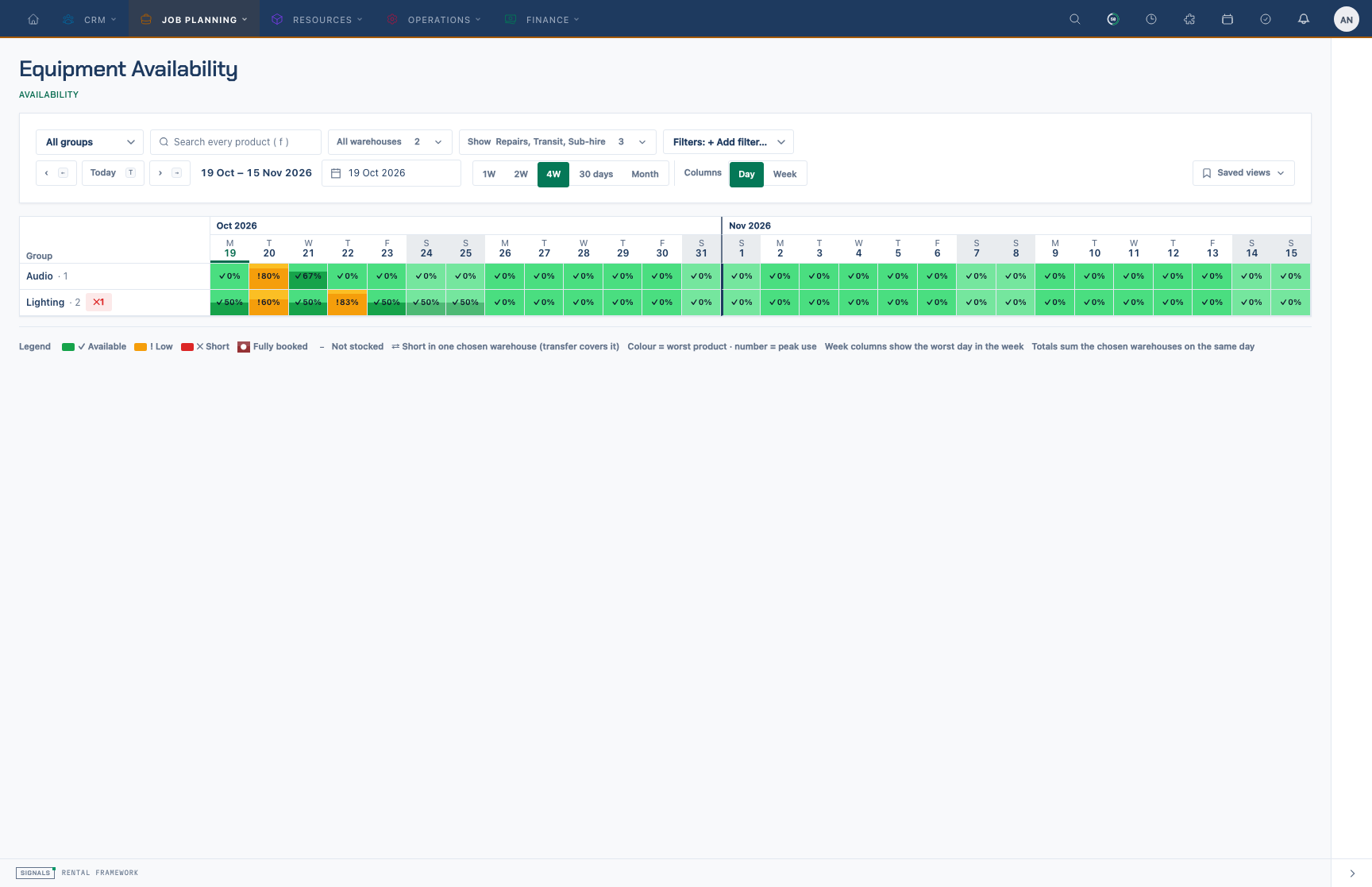
Group heatmap on /availability. One row per root catalogue group; each cell is coloured by the worst catalogue item state that day (free, low, short) and shows the peak quantity in use. Click a row to open its catalogue item grid.
It is read-only: it reflects bookings, repairs, transfers and sub-hires made elsewhere. Every view is gated on availability.view.
Where it appears
| Route | Name | What it shows |
|---|---|---|
/availability |
availability.index |
The full workspace: group heatmap → catalogue item grid → catalogue item detail. |
/rentals/{rental}/availability |
rentals.availability |
Rental scope: the rental's catalogue item lines, span starting on the hire dates, no heatmap. Trashed rentals open too. |
/catalogue-items/{id}/availability |
catalogue-items.availability |
Catalogue item scope: locked to the item, opens on its detail. |
/assets/{asset}/availability |
assets.availability |
Asset scope: locked to the asset's catalogue item, Timeline with the asset's row highlighted. Tab shown under Operations to users with availability.view. |
/availability/bookings/{item}/{from}/{days} |
availability.bookings |
Redirect (301) to /availability?item=…&start=…&span=…. Kept so original links keep working. |
All four pages render one Livewire component, availability.workspace (resources/views/livewire/availability/workspace.blade.php), with a locked scope (global, rental, catalogue-item, asset) and scopeId. The component is lazy-loaded behind a skeleton sized to the requested span.
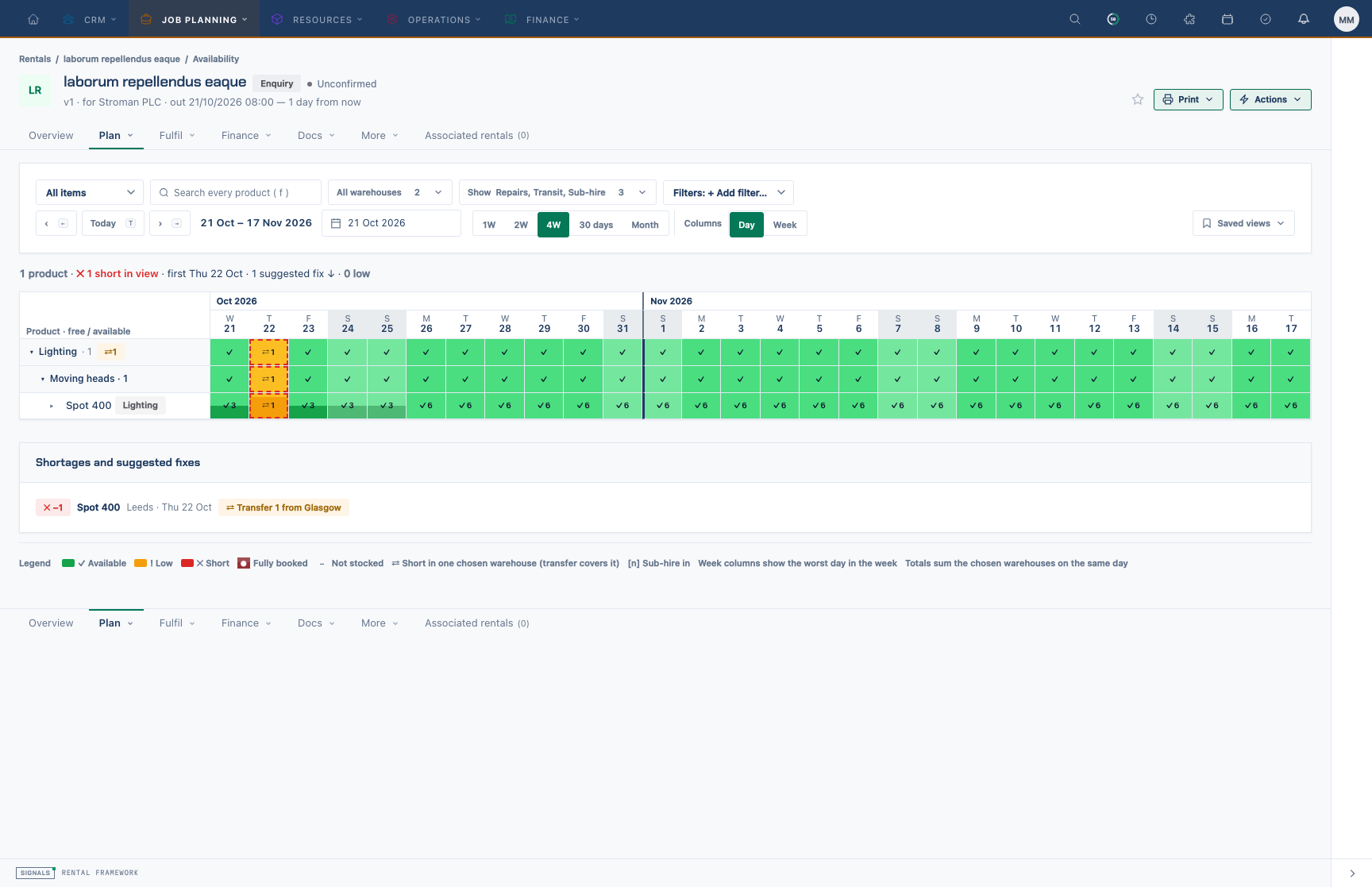
Rental scope (/rentals/{rental}/availability). Only the rental's catalogue item lines are listed and the span starts on the hire dates; there is no heatmap.
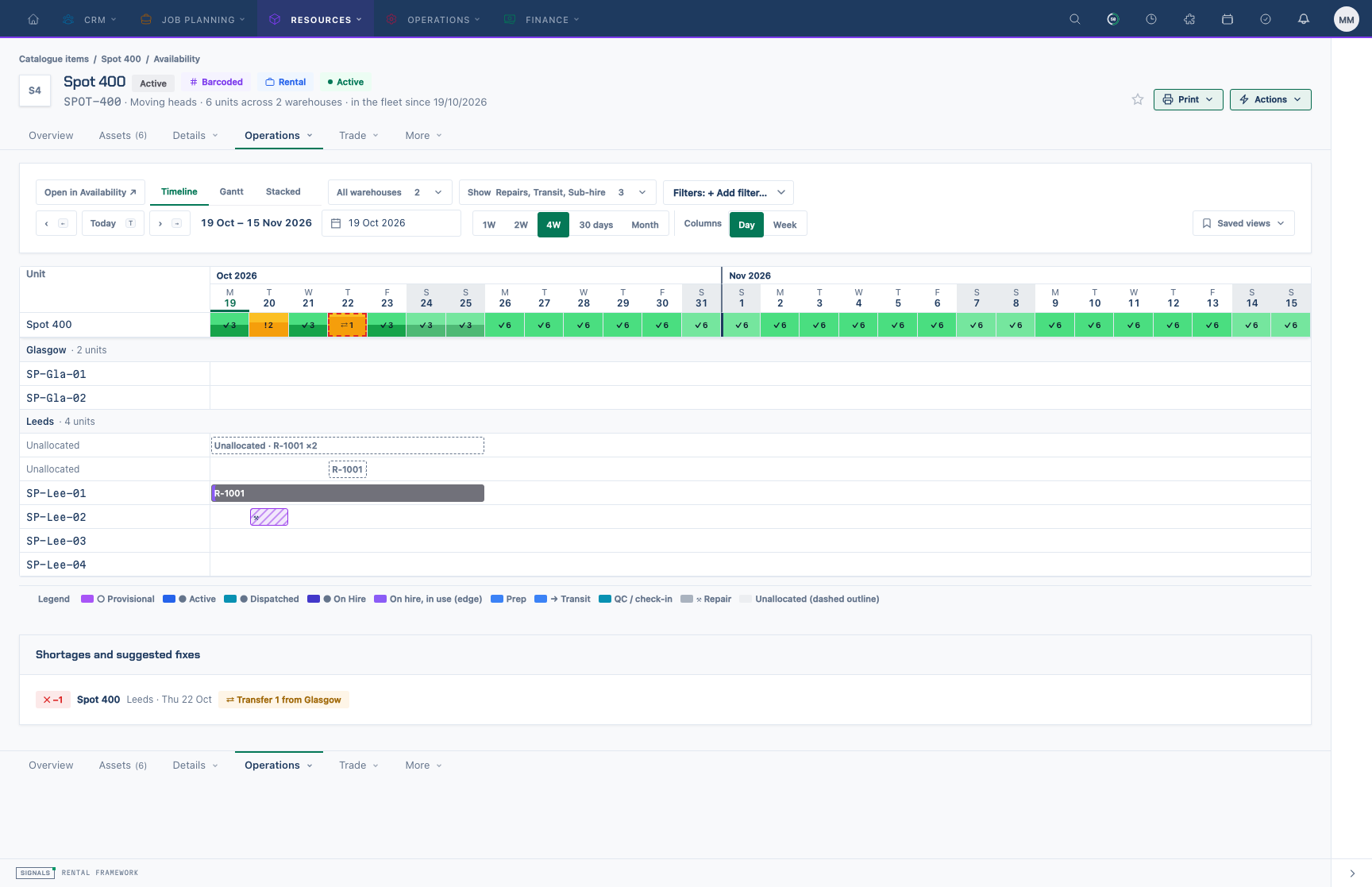
Catalogue item scope (/catalogue-items/{id}/availability). The workspace is locked to the item and opens straight on its catalogue item detail.
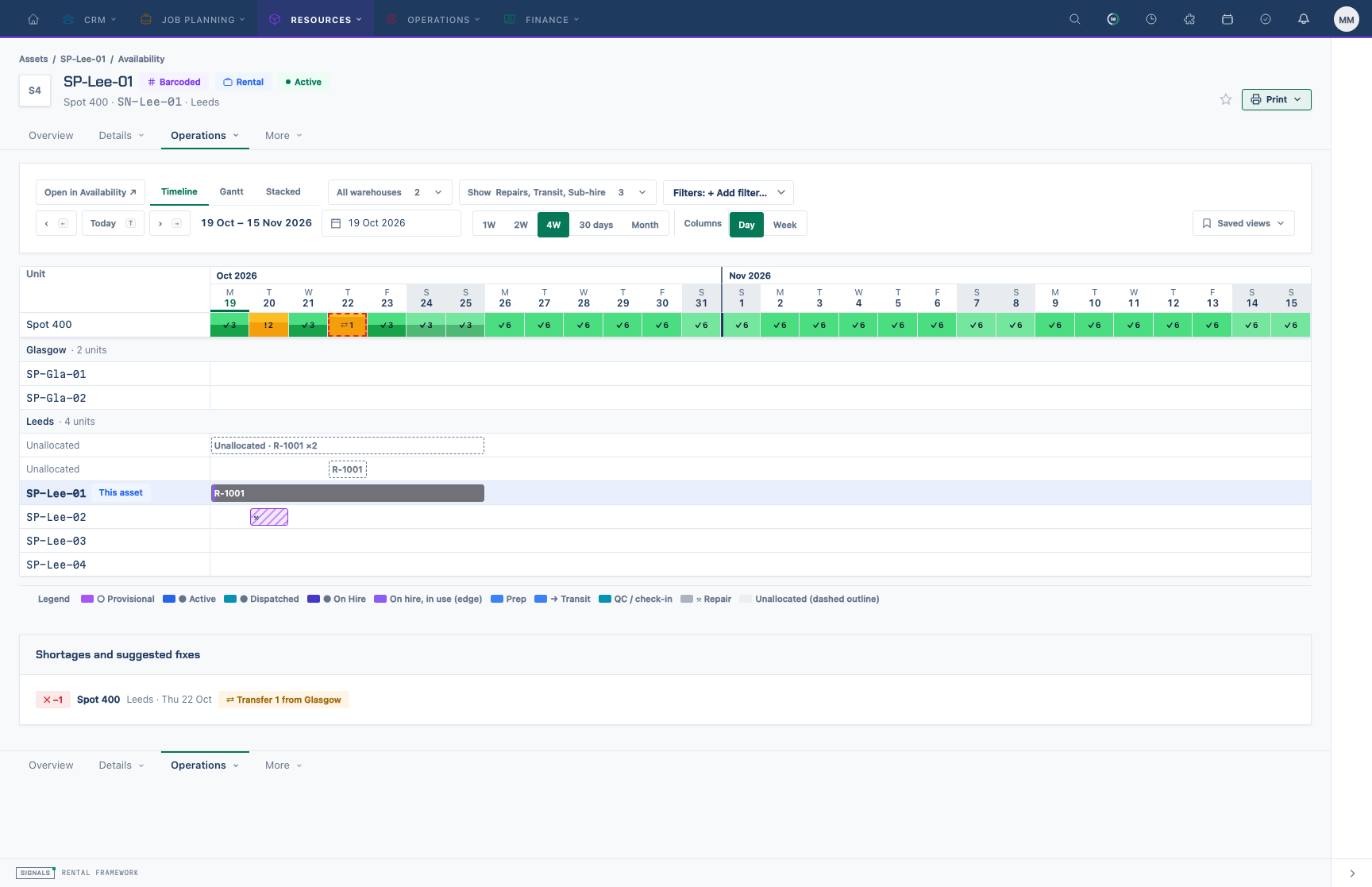
Asset scope (/assets/{asset}/availability). Locked to the asset's catalogue item, on the Timeline tab with this asset's row highlighted.
The three depths
- Group heatmap (global page with no group or search): one row per root catalogue group; a cell's colour is the worst catalogue item state that day, its number the peak use.
- Catalogue item grid (a group is picked, or a search is typed): catalogue items grouped by group and sub-group with summary rows; each cell shows free / available. A catalogue item row can be split by warehouse (▸).
- Catalogue item detail (a catalogue item is open): the grid row for that catalogue item on top of three tabs —
- Timeline: one row per serialised unit (hire, repair, transit blocks), plus Unallocated lines for demand without a unit and, with quotes counted, Quote lines. Bulk catalogue items point to the Gantt.
- Gantt: free-stock band stacked by warehouse, the total-free line and readouts, then one bar per rental, repair, transfer and sub-hire.
- Stacked: booked · quoted · repair · free against capacity per column.
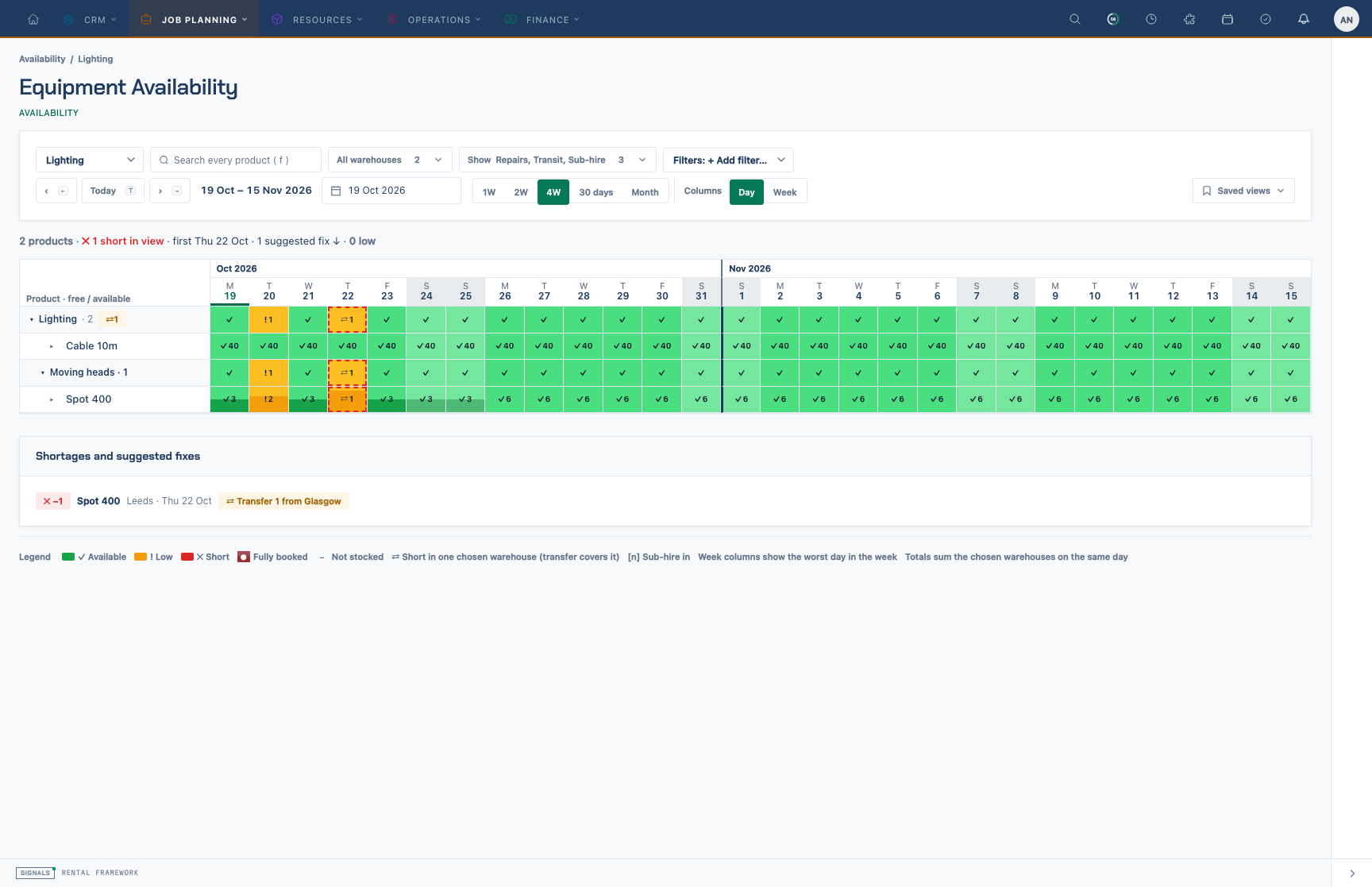
Catalogue item grid. Catalogue items sit under group and sub-group summary rows; each cell reads free / available for that day. Short and low days take the schedule branding colours, and ▸ splits a row by warehouse.
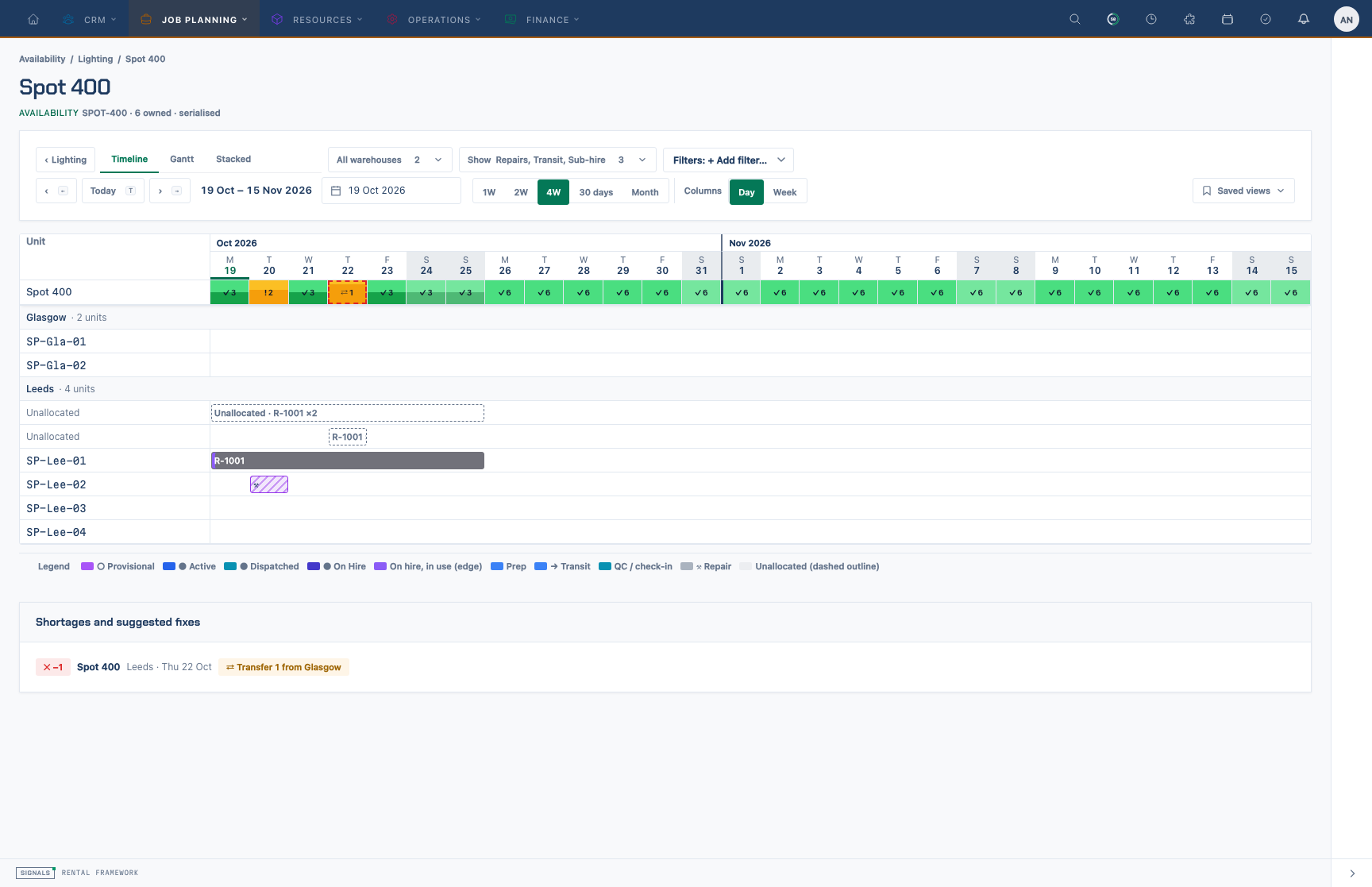
Timeline tab. One row per serialised unit with hire, repair and transit blocks, plus Unallocated lines for demand not yet on a unit (and Quote lines when quotes are counted).
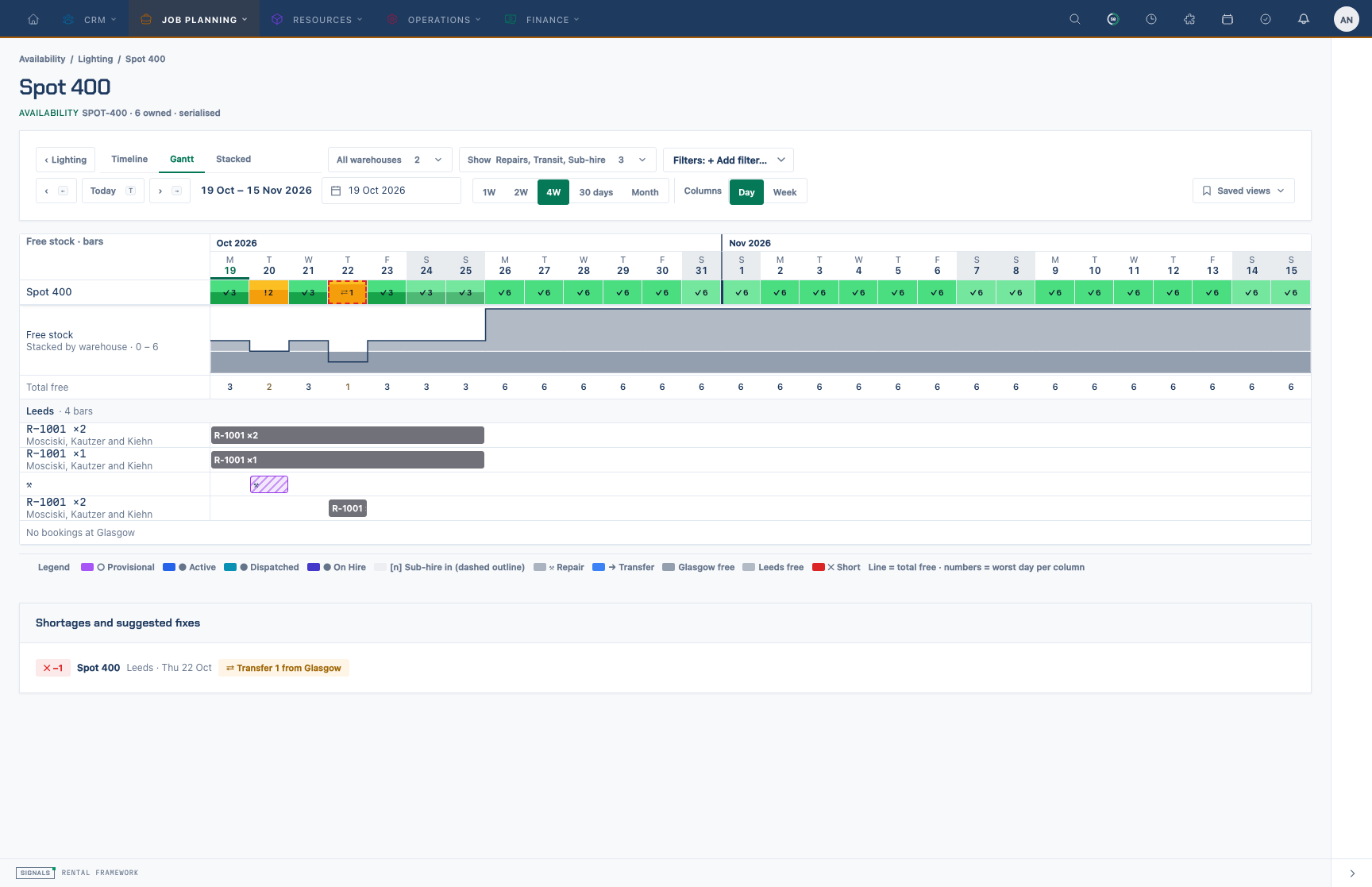
Gantt tab. The free-stock band stacked by warehouse with the total-free line and readouts on top, then one bar per rental, repair, transfer and sub-hire.
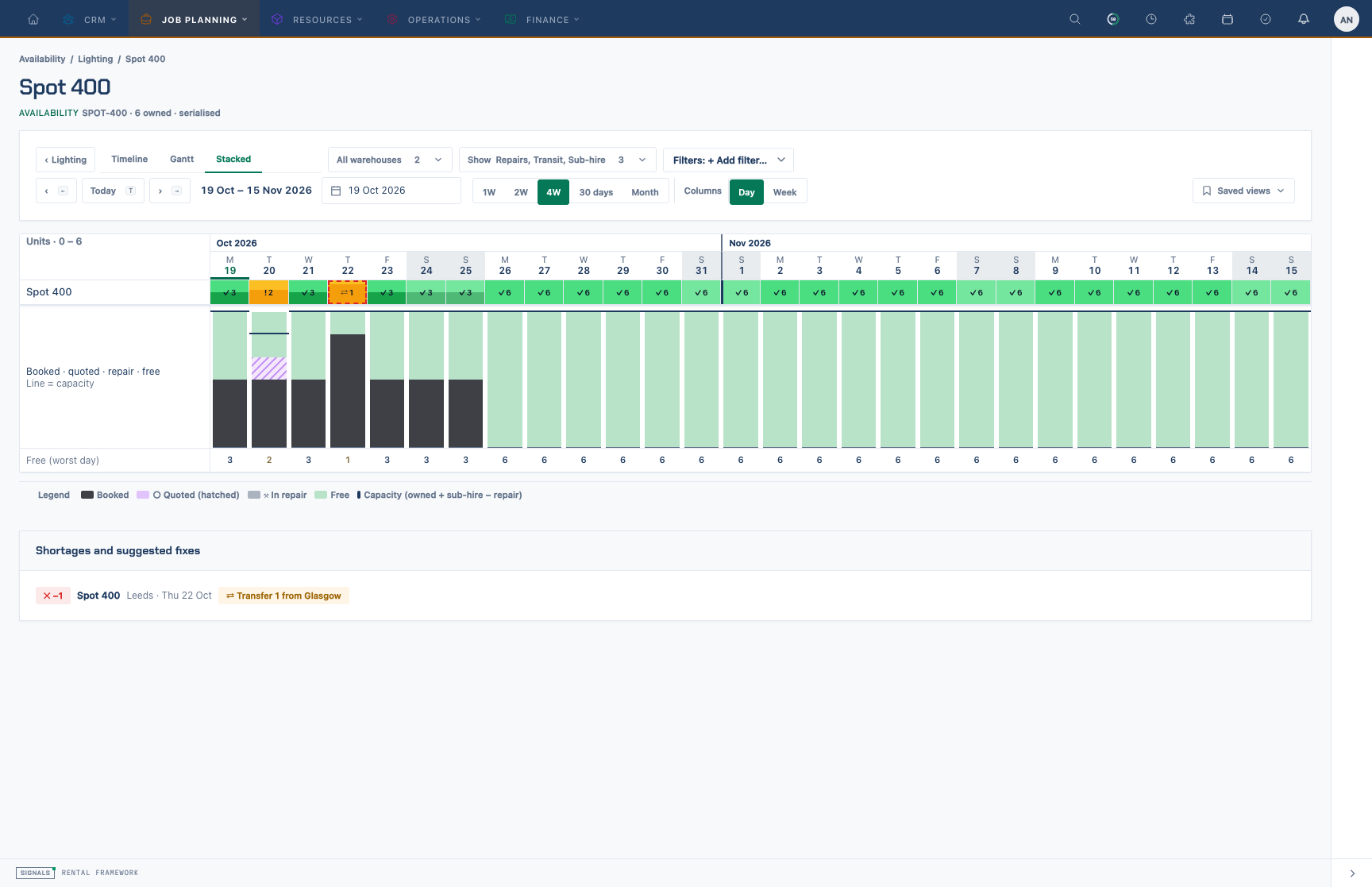
Stacked tab. Each day's column splits capacity into booked, quoted, in repair and free; the line marks capacity (owned + sub-hire − repair) and the footer gives the worst-day free figure.
Catalogue groups are a tree; the workspace uses the root as group and its child as sub-group; deeper groups fold into their level-2 ancestor.
Controls (one bar at every depth)
Group and search (or the back link and detail tabs), Warehouses, Show and Filters stay in the same order as you move between depths. The date controls, span, Day / Week columns and Saved views sit together on the right.
| Control | URL key | Notes |
|---|---|---|
| Group / search | group (root id), q |
Search matches name, SKU and group names across every catalogue item. |
| Warehouses | wh (ids) |
Empty = all default-query warehouses. Totals add the chosen warehouses on the same day. |
| Show › Include demand | d |
quotes, repairs, transit, subhire. Default repairs,transit,subhire = the engine's own figures. |
| Filters › Availability | f |
Short only or Low only — keep only catalogue items short (or low or short) on any day in the span. Active choices appear as removable chips. |
| Filters | t |
Include/exclude tokens, e.g. tag:Touring,!group:Video. Fields: group, subgroup, tag, tracking, supplier, status. Values OR within a field, fields AND, any matching exclude drops the catalogue item. |
| Span | span |
1w, 2w, 4w (default), 30d, month. |
| Columns | per |
Day (default) or week (worst day per week). |
| Start | start |
Default today; ‹ / › step one span; Month steps by the preceding month's length. |
| Split rows / catalogue item / tab | open, item, tab |
Original /availability links are mapped on load: warehouses[] → wh, from → start, shortages=1 → f=short, warnings=1 → f=low, days → nearest span.
Keyboard: ← / → preceding/next span, T today, F search, Esc up one level, arrow keys move between cells, Enter opens a cell, Shift+Enter shows its warehouse split, ? lists shortcuts.
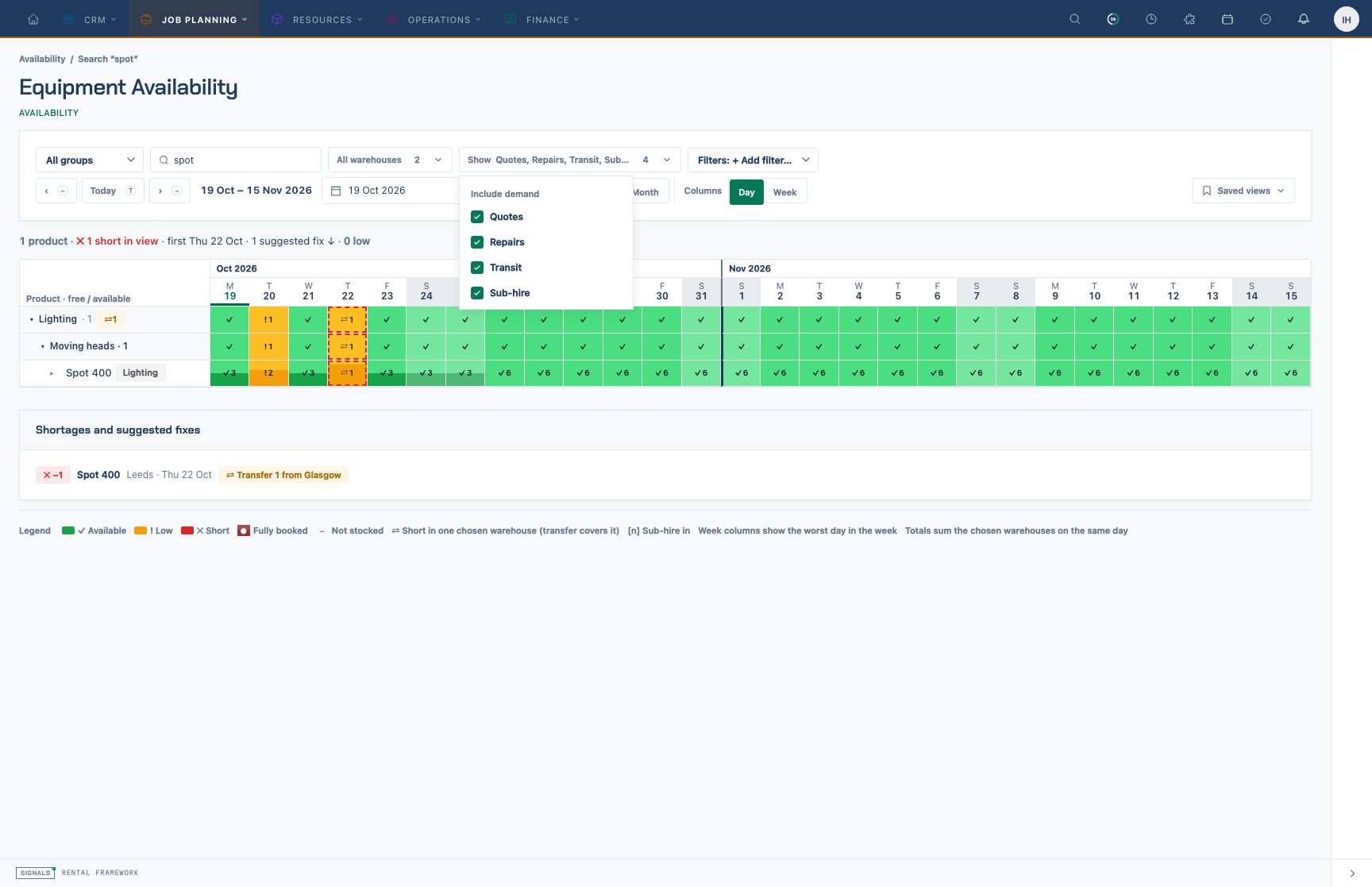
Show menu. Choose which demand types count against stock (quotes, repairs, transit, sub-hire) and use Filters → Availability → Short only / Low only to narrow the grid.
How the figures are worked out
Figures come from the availability grid, one set-based read per render:
- Free stock is the engine snapshot's
availablefor the warehouse's local day (the worst slot of the day for half-daily or hourly resolutions). A day with no snapshot is fully free. - Turning a demand type off adds its
demand_breakdownamount back (repair,warehouse_transfer); turning sub-hire off takes the incoming units (virtual_stock_intake, negative demand) away. - Quotes (pencilled quotes and unconfirmed enquiries) are Draft-phase rental demand that the engine records inactive; with Quotes on they are read live and subtracted. Soft-deleted rentals are ignored.
- Short / Low use the availability colour rules: short when free is below the short threshold (
colour.availability.short_threshold, default 0 = only real shortages), low at or below the warning threshold (colour.availability.warning_threshold, default 2). Both are set under Settings › Branding › Schedule, with the availability and schedule colours. - ⇄ local shortage: the total is fine but one chosen warehouse is short — a transfer covers it.
The number of database queries stays constant regardless of how many catalogue items, units and days are shown.
Tooltips and Open links
Every cell, block, bar, readout and stacked column has a rich tooltip. Catalogue-item-tab tooltips show the rental's status (in its status colour), the customer — only to users with rentals.view — the out/back times, and an Open … ↗ link to the rental, repair, warehouse transfer or purchase order, opening in a new tab.
Shortage fix suggestions
Signals turns each run of days with negative free stock (per catalogue item and warehouse) into a shortage with a suggestion: transfer from another chosen warehouse that has enough free stock every day of the run (the one with most spare), otherwise sub-hire the peak shortfall. Suggestions are shown under the grid and catalogue item detail and are read-only. Resolve shortages on the rental's Shortages panel.
Saved views
A saved view is a workspace query string. Built-in Example views are always listed and cannot be deleted; users save, rename, reorder, delete (with undo) and set a default view that opens on a bare /availability visit. Views are per user (user_preferences keys availability.saved_views, availability.default_view), capped at 25, and normalised to known keys.
Live updates
The workspace subscribes to availability.warehouse.{id} for the chosen warehouses (and availability.rental.{id} in rental scope) and re-reads when the engine broadcasts a change.
REST API and MCP
| Endpoint | Use |
|---|---|
GET /api/v1/availability/workspace |
The read model above: columns and catalogue item rows with per-cell free, available, state, booked/quoted/repair/transit/sub-hire, local and per-warehouse splits, plus thresholds. Filters: from, span, period, warehouse_ids.*, demand.*, group_ids.*, catalogue_item_ids.*, tags.*, exclude_tags.*, tokens, search, highlight. Ability availability:read. |
GET /api/v1/availability/shortage_suggestions |
Shortage runs with transfer / sub-hire suggestions for the same filters. |
GET/POST /api/v1/me/availability_views, PATCH/DELETE /api/v1/me/availability_views/{id}, PUT /api/v1/me/availability_views/order, PUT /api/v1/me/availability_views/default |
The current user's saved views. |
GET/PUT /api/v1/settings/colour |
Includes availability.warning_threshold and availability.short_threshold. |
/api/v1/catalogue_tags, PUT /api/v1/catalogue_items/{id}/tags |
See Catalogue Tags. |
MCP tools: get-availability-workspace, list-shortage-suggestions, list-availability-views, save-availability-view, update-availability-view, delete-availability-view, set-default-availability-view, plus the catalogue tag tools and the existing check-availability, list-availability-events and list-shortages.
Example:
curl -G https://your-signals.example/api/v1/availability/workspace \
  -H "Authorization: Bearer $TOKEN" \
  --data-urlencode "span=2w" --data-urlencode "demand[]=quotes" --data-urlencode "demand[]=repairs" \
  --data-urlencode "tags[]=Touring" --data-urlencode "highlight=short"
The same figures appear on the page, over REST and through MCP (parity is tested).
Availability engine
Signed demand model
The engine derives availability as held stock − signed demand for a catalogue item, warehouse, and time slot. Positive demand consumes stock. Negative demand is the supported representation for expected supply; subtracting it increases availability during its active window.
Warehouse transfer pairing
An in-transit warehouse transfer owns two availability effects for each line:
- a positive origin row for each remaining loose quantity or unreceived serial, beginning at dispatch;
- one negative bulk row at the destination for the eligible remaining quantity, beginning at the later of dispatch and planned arrival.
The stock ledger does not move at dispatch. On partial receipt, physical destination stock increases and both availability effects shrink by the same quantity, preventing either a gap or double count. Full receipt and cancellation void both halves.
A picked serial with an active mid-transit repair is excluded from origin transfer demand and destination inbound supply. Releasing the repair re-synchronises the pair; receiving repaired stock re-homes the repair demand to the destination.
Availability events
Availability events are the demand-management log. Each row is append-only (created_at only — events are never updated) and records why availability changed: a demand was created, updated, or released; stock moved; snapshots were recalculated; or a shortage was detected or cleared.
The event vocabulary is AvailabilityEventType (demand_created, demand_updated, demand_released, stock_changed, availability_recalculated, demand_overdue, shortage_detected, and the other cases on that enum). Writers are DemandObserver (demand lifecycle), RecalculationPipeline (snapshot refresh), and PipelineShortageEmitter (shortage detect/clear).
The ref on each event is availability_event:{id}.
API
| Method | URL | Summary | Ability | Weight |
|---|---|---|---|---|
GET | /api/v1/availability_events | Index availability events | availability:read | 1 |
GET | /api/v1/availability_events/{availability_event} | Show availability events | availability:read | 1 |
Both endpoints require availability.view and the availability:read token ability. The index is filtered to the actor's accessible warehouses; show returns 404 (non-disclosure) for events outside that set. Owners and all_warehouses roles bypass the warehouse scope.
Filter the index with filter[field][operator] predicates — for example filter[event_type][eq]=shortage_detected, filter[catalogue_item_id][eq]=7, filter[created_at][gte]=2026-07-01. Default sort is newest first.
The curated MCP tool list-availability-events wraps the index. There is no write API and no curated write tool — the log is produced only by the engine.
Related
- Checking Availability Before You Quote, Checking Availability on a Rental, Checking a catalogue item's Availability
- Shortages — detecting and resolving shortfalls.
- Branding — availability colours and thresholds.