Checking Availability on a Rental
Read availability for a rental's own items over its hire dates, open any item's timeline or gantt, and act on shortages from the rental's Availability tab.
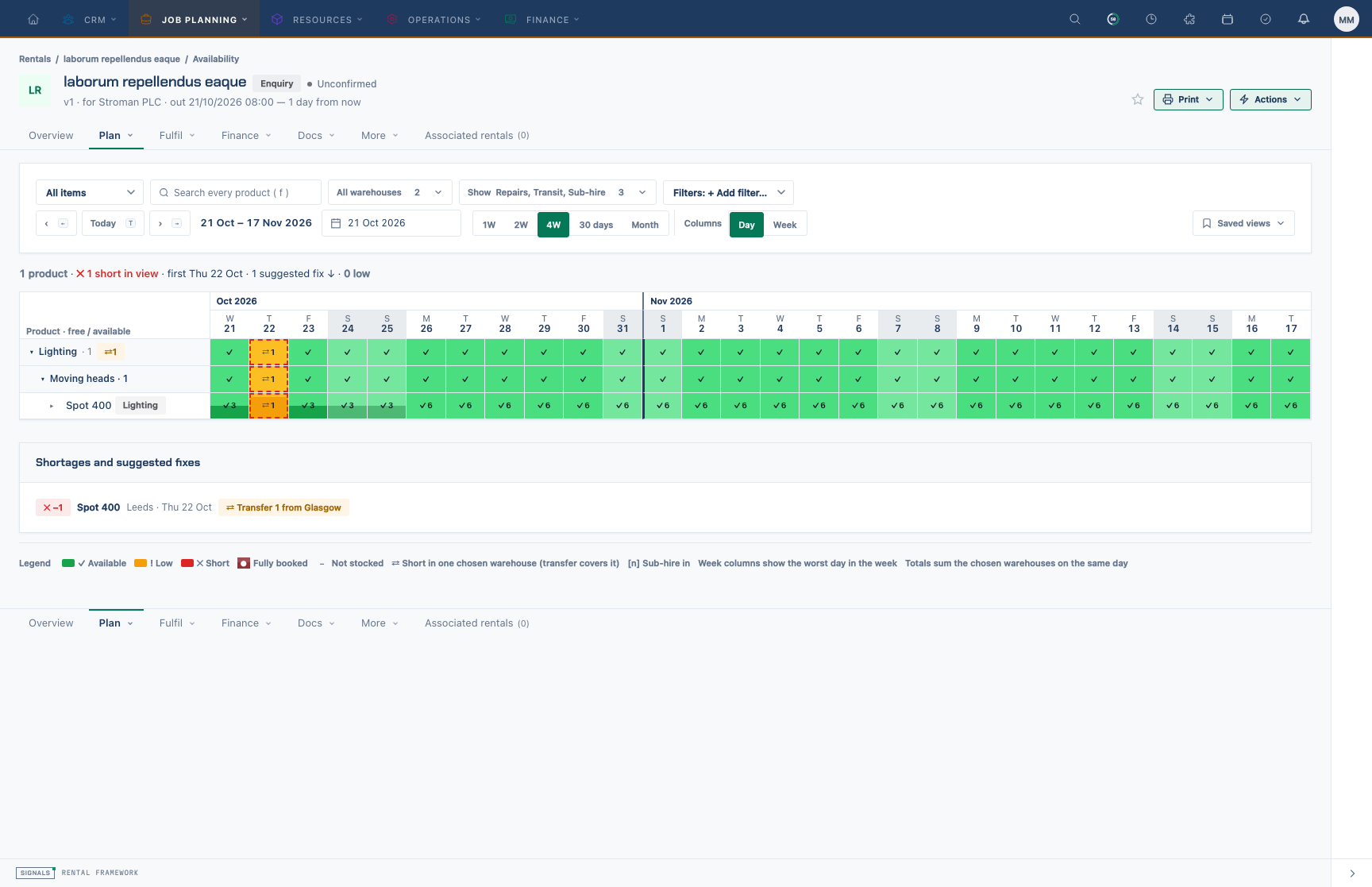
The Availability tab on a rental shows the same availability workspace as /availability, limited to this rental.
What the tab shows
- Rows are the rental's catalogue item lines with a quantity (services and text lines are left out). There is no group heatmap here.
- The span starts on the hire start date (the earliest line start, else the rental start, else today). Change it with the span buttons, ‹ / ›, Today or the date picker, exactly as on the main page.
- Live — the tab refreshes when stock or bookings for this rental or its warehouses change elsewhere.
- Deleted rentals can still be opened, so you can see what they held.
If the rental has no catalogue item lines, the tab says No catalogue item lines — add items first.
Check the hire
- Open the rental and choose Availability.
- Tick the Warehouses that could supply the job and, under Show, decide whether Quotes, Repairs, Transit and Sub-hire count. Turn Quotes on to see the effect of other provisional quotes on your dates.
- Read each row's cells: ✓ available, ! low, ● fully booked, ✕ short, ⇄ short in one warehouse only. The thresholds and colours come from Settings › Branding › Schedule.
- Use Show › Highlight › Short to keep only the items that are short somewhere in the span.
Look closer at one item
- Select an item's cell to open it on Timeline (units and unallocated lines), or switch to Gantt (bars per rental, repair, transfer and sub-hire) or Stacked (booked, quoted, repair and free against capacity).
- Hover a bar for the rental, customer, status and dates; Open … ↗ opens it in a new tab.
- Use ‹ Rental items or Esc to go back to the rental's rows.
Act on a shortage
Shortages and suggested fixes below the grid suggests a transfer from another chosen warehouse when one can cover the whole run, otherwise a sub-hire of the shortfall. Nothing is booked for you — use the rental's Shortages tab or Resolving a Shortage to act.
Keyboard shortcuts
← / → previous and next span · T today · F search · Esc up a level · arrow keys move between cells · Enter opens a cell · ? lists every shortcut.
Save it
Saved views works here too: save a view (span, warehouses, demand, filters) and apply it on any rental's Availability tab.