Rental Diary
Every quote and order across your dates, lane-packed, in a Timeline or a zoomable Gantt, grouped by warehouse, status or project. Read-only.
Overview
The Rental Diary plots every active quote and order across a date window so you can see when jobs run, how they overlap, and where delivery, use and collection fall. It is read-only: selecting a bar opens the rental, and dates are changed on the Rentals pages.
Route: /rental-diary (name rental-diary), gated on rentals.access. Add ?project={id} for one project's diary (also needs projects.access and view permission on the project). Rentals for privacy-restricted accounts are left out unless you hold accounts.privacy.case.
The page shares its chrome with Equipment Availability: the same page header, toolbar, date controls, saved views, dropdowns, day header, skeleton, legend and tooltips. The component is rental-diary.index (resources/views/livewire/rental-diary/index.blade.php), lazy-loaded behind a skeleton sized to the requested span.
Views
| View | What it shows |
|---|---|
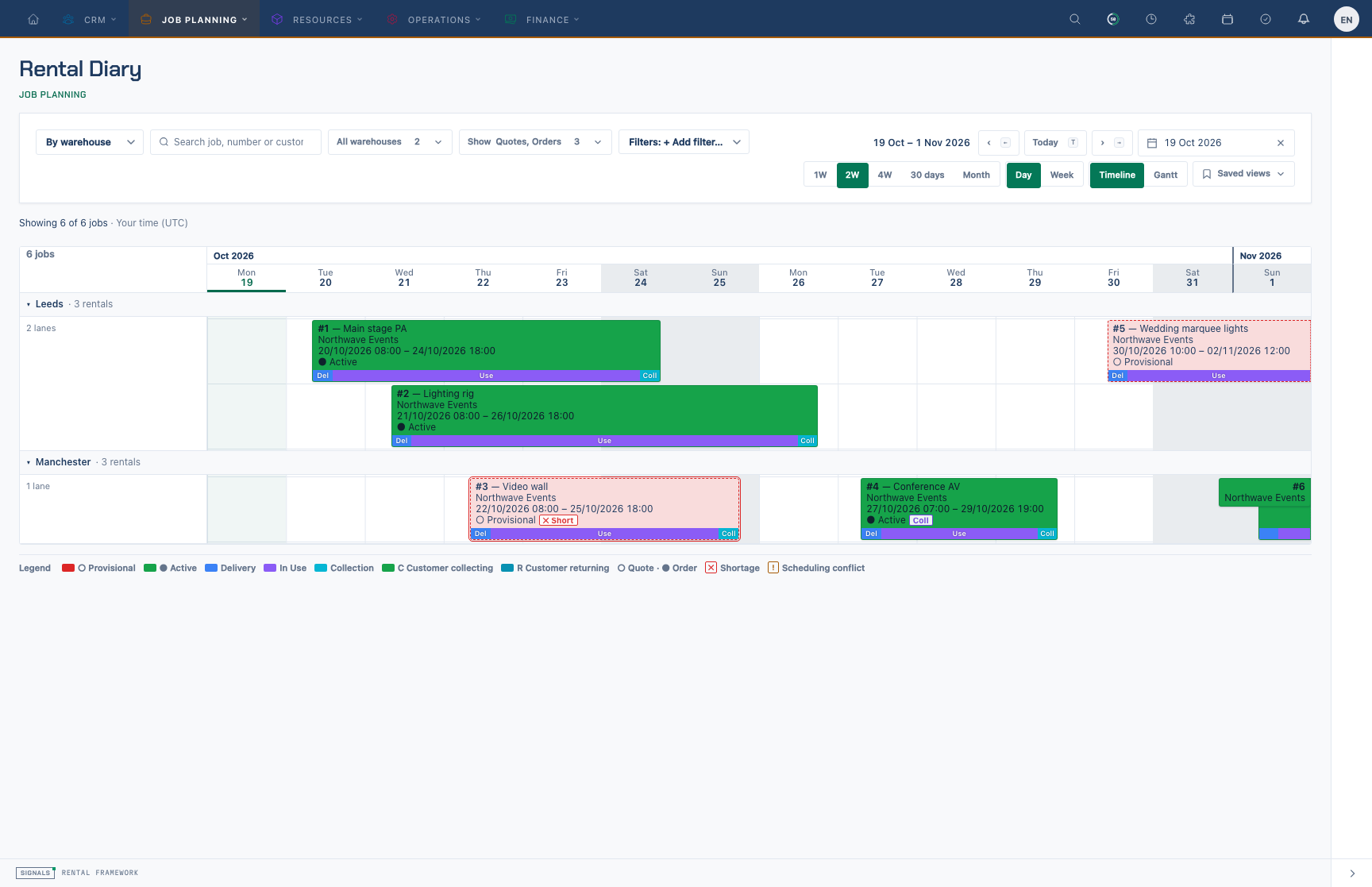
| Timeline | Two-line bars fitted to the span: status glyph, rental number and status word on the first line, title and customer on the second. Best for reading. |
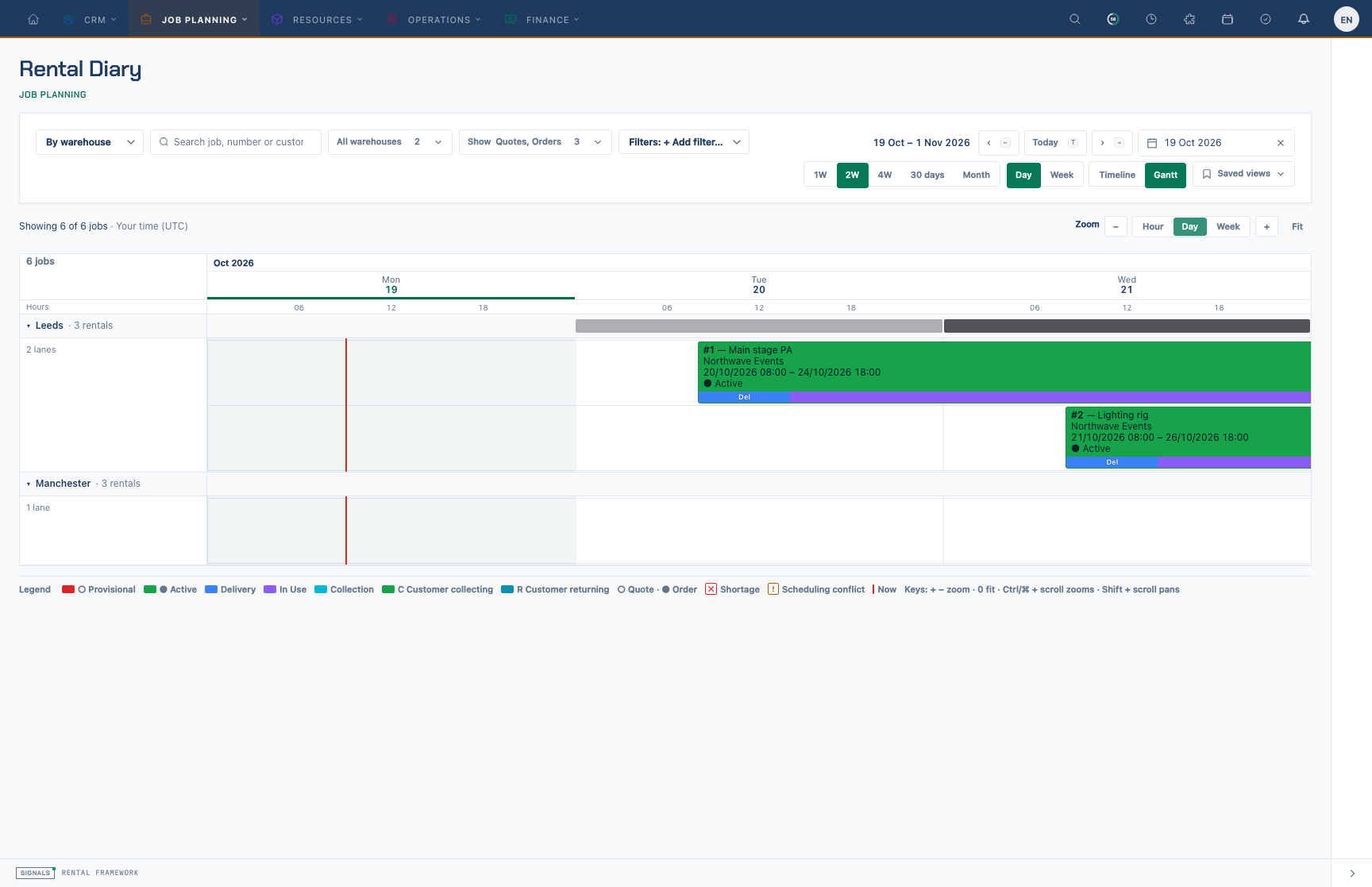
| Gantt | One-line bars on a zoomable track: an hour tier appears once a day is wide enough, a red now line marks the current time, and each group header carries a density strip (how many jobs are active per column). Zoom and pan happen in the browser, with no page reloads. |
Gantt zoom: Hour, Day, Week and Fit buttons, + / − / 0 keys, Ctrl/⌘ + scroll to zoom around the pointer, Shift + scroll or drag empty track to pan.
Bars
- Each bar is a card: rental number and title, then the customer, then the status (glyph + word) with its badges, and a phase band along the foot, using definition labels and colours in rental sequence order. Five definitions are visible on a fresh installation: Preparation, Delivery, Event, Collection and Turnaround. Segments follow their actual intervals, with neutral gaps and a tick for today. Overlapping phases occupy separate tracks so each interval remains readable; the tooltip lists their ranges. Narrow cards show the number and customer, then the number only; the tooltip always has everything. In the Gantt, zoomed out past about 72px a day, cards drop to one line.
- Rentals that overlap are packed into lanes inside their group; touching rentals share a lane. Faint lines mark each day and each lane; weekends and today are shaded.
- Fill = the rental's status colour from the tenant's status registry (Colour Coding); quotes are a dashed tint. Status is always shown as glyph + word (○ quote, ● order), never by colour alone.
- A card covers the hire window, displayed complete positive phase intervals and the reserved extent. A rental appears whenever that continuous span overlaps the view. Equal endpoints appear as markers without extending the span; partial phases do not extend it. Hidden non-blocking phases extend the card only with All configured phases selected.
- Phase colours and labels come from Rental phases; the now line uses
colour.diary.now_line. Show → Phases and badges hides the band. Coll and Ret badges mark customer collecting and returning. - ✕ Short marks a rental with an equipment shortage; ! Conflict marks an unresolved scheduling conflict on one of its crew, vehicle or facility assignments. Both also outline the bar.
- A dotted end means the job carries on outside the window.
- Hover or focus a bar for its tooltip: status, customer, dates (and your own time when the grid is in warehouse time), warehouse, project, phases, warnings, and Open R-… ↗ (new tab).
Equipment reserved extent
The dashed Equipment reserved extent marker distinguishes reservation from the planning phase bands. In operational mode it covers hire plus all complete positive blocking phases, including hidden blocking phases and gaps. In charge mode it uses the charge window with independent hire-endpoint fallbacks and ignores blocking extensions. Turning on All configured phases can widen the planning card without changing demand. A hidden blocking phase affects the default card in operational mode; in charge mode it needs All configured phases to widen the card beyond hire and charge reservation.
The marker represents the rental-level window. Explicit line dates, catalogue buffers, asset movements and rental status still determine individual equipment demand. See blocking and charge windows.
Toolbar
Laid out exactly like Availability's control bar, on one row at desktop widths: Group (By warehouse · By status · By project) joined to the search (f), Warehouses ▾, Show ▾, Filters: + Add filter…, then — right-aligned — the span (1W 2W 4W 30D Month dropdown), the columns (Day | Week dropdown), Saved views (bookmark icon), and ‹ Today › with the date picker (← T →). Narrower screens wrap the filters under the date controls. Timeline | Gantt sits in the page header. Each job is one card covering its own lifecycle span; a long label is cut short inside the card (hover for the full details), and jobs that meet in one lane keep a small gap.
| Control | Effect |
|---|---|
| Group | By warehouse (default): one row per selected warehouse, even with 0 rentals. Under All warehouses, jobs without a warehouse appear in a No warehouse row. By status and By project group those jobs normally (association children indent under their parent). Groups collapse and show their counts. |
| Warehouses ▾ | Multi-select; at least one stays selected. All warehouses includes unassigned jobs and jobs in accessible warehouses, including warehouses outside the default-query list. Selecting specific warehouses excludes unassigned jobs and other warehouses. |
| Show ▾ | Quotes / Orders; Phases and badges (band and Coll/Ret badges); All configured phases (include hidden definitions); Conflicts only (shortage or scheduling conflict); Warehouse time (only with exactly one warehouse selected; widening the filter returns to your time). |
| Filters: + Add filter… | Adds a status filter (quote and order statuses from the registry) as a chip; × removes it. |
The count above the board reads "Showing x of y jobs"; the diary draws at most 200 jobs. With nothing to show, the board still draws its dates and group rows.
Diary query parameters include start, span, per, wh, q, project, view, group, states, st, phases, all_phases, conflicts and tz.
Small screens
Below the app's large breakpoint the board is replaced by the same panel as Availability: "Rental diary works best on a larger screen", with Copy link, Set up MCP and Continue anyway (remembered for the session).
Saved views
Saved views is the same menu as Availability: built-in examples, your own views, Save current view…, and Manage (rename, reorder, delete with undo, set a default). A view includes the All configured phases selection (all_phases=1) in the page's query string; the default view opens when /rental-diary has nothing in its address. Views are per user (user_preferences keys rental_diary.saved_views and rental_diary.default_view), separate from Availability's.
Grid time
Every bar, lifecycle bar and label is drawn in one grid timezone: your own, or the single selected warehouse's when Time → Warehouse is on. Day columns start at local midnight, including across daylight-saving changes.
API and MCP
| Endpoint | Use |
|---|---|
GET /api/v1/rental_diary |
The board: range, axis columns, totals, groups with lane-packed bars (hire window starts_at/ends_at, lifecycle extent lifecycle_starts_at/lifecycle_ends_at, start_min/end_min over the lifecycle and hire_start_min/hire_end_min, minutes from the window start; phases in rental sequence order with phase, label, colour, ink, blocking, start_min and end_min; reserved_start_min/reserved_end_min identify the equipment reserved extent; shortage/conflict flags), status options and warehouses. Filters: start, span, period, warehouse_ids.*, search, project_id, states.*, statuses.*, conflicts_only, group_by (warehouse default, status, project), timezone, phases, all_phases (include hidden definitions), limit. Ability rentals:read. |
GET/POST /api/v1/me/rental_diary_views, PATCH/DELETE /api/v1/me/rental_diary_views/{id}, PUT /api/v1/me/rental_diary_views/order, PUT /api/v1/me/rental_diary_views/default |
The current user's saved diary views (examples are read-only). |
Each API and MCP axis column exposes is_today, is_weekend, is_past, month_start and is_monday flags.
MCP tools: get-rental-diary, list-rental-diary-views, save-rental-diary-view, update-rental-diary-view, delete-rental-diary-view (confirm=true), set-default-rental-diary-view.
curl -G https://your-signals.example/api/v1/rental_diary \
  -H "Authorization: Bearer $TOKEN" \
  --data-urlencode "span=2w" --data-urlencode "group_by=status" \
  --data-urlencode "states[]=orders" --data-urlencode "conflicts_only=1"
The page, REST and MCP read the same model (rental diary data), and parity between them is tested. Query counts stay flat as rentals, days and warehouses grow.
Additional form guidance
Before any rental exists, the diary shows No rentals to schedule yet with a permitted New Rental action. Once a rental exists, including an archived one, an empty date span keeps the normal board.
Related
- Using the Rental Diary and Timeline
- Equipment Availability — the same chrome over stock figures.
- Scheduling — crew, vehicle and facility assignments and conflicts.
- Shortages