Reports
Build, save, share, export, and schedule aggregated reports over commercial records, equipment, and the stock ledger.
Daily fleet-utilisation summaries retain two-decimal stock balances for held, allocated, unavailable, sub-hire supply and available quantities. A barcoded asset contributes one serialised unit; loose-stock balances retain fractional quantities.
Overview
A report is a saved aggregation: pick a source (the kind of record you are counting), one or more dimensions (what to group by), one or more measures (what to total), a date window, and optional filters. Running it returns a grid of rows, optional subtotals, and a grand total.
Reports are the sibling of saved list views. A list view describes a layout over individual records; a report describes an aggregation over many of them. Both use the same system / personal / shared audience model, so sharing behaves identically in both places.
Reports never invent numbers. Every figure is read from the records you already have, under the permissions of the person running it — two people running the same report can legitimately see different totals if they can see different warehouses.
For a shorter task-led walkthrough, see Building a Report.
Where it lives
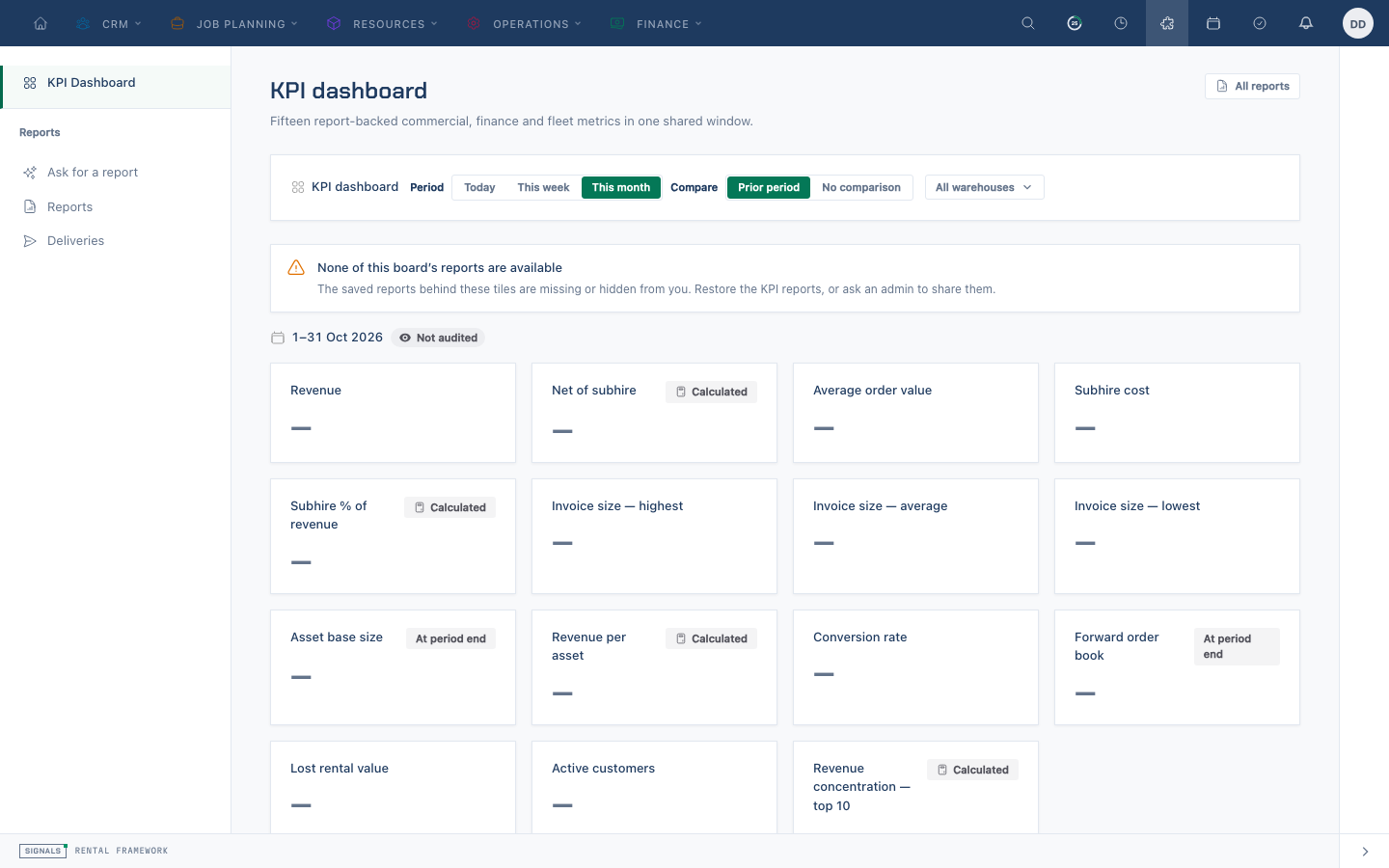
Routes: /reports opens the KPI dashboard; /reports/list lists saved reports, /reports/view/{id} opens the reader, and /reports/new creates a definition. The sidebar also provides Ask and Deliveries. /reports/builder and its ?report={id} form redirect to the new workspace.
Permissions:
| Permission | Grants |
|---|---|
reports.access |
Reach the Reports area at all |
reports.view |
Open and run reports |
reports.ask |
Draft a report using Ask when the feature is enabled and acknowledged |
reports.export |
Export a result to CSV, XLSX, or PDF |
reports.create |
Save a new report |
reports.update |
Edit a report and manage its schedules |
reports.delete |
Delete a report |
On top of these, running a report also requires the source's own view permission (for example invoices.view for an invoice report), so reporting can never become a side door around record permissions.
Sources, dimensions, and measures
A source is a registered starting point — the core framework includes:
| Source | Records | Requires | Default date field | Description |
|---|---|---|---|---|
finance_receivables | Subledger Receivables Ageing | invoices.view | posting_date | Signed admitted receivable movements with original captured due dates; sum through an as-of posting date for ageing balances. Missing due dates remain explicit. |
finance_cash | Subledger Cash | invoices.view | posting_date | Captured manual cash and provider clearing movements by posting date and document currency. |
finance_unapplied_cash | Subledger Unapplied Cash | invoices.view | posting_date | Captured unapplied-funds credits less debits; no invoice status or current balance arithmetic. |
rentals | Rentals | rentals.view | created_at | Quotes, orders and their pipeline values. |
invoices | Invoices | invoices.view | issued_at | Issued invoices, payments and outstanding balances. |
invoice_cost_variance | Invoice Cost Variance | invoices.view | invoice.issued_at | Live actual costs against frozen issue estimates. Received PO cost, otherwise open commitments (incomplete), otherwise recorded rental costs. Money is in the frozen base currency. |
invoice_revenue | Net Invoice Revenue | invoices.view | issued_at | Signed posted invoice and effective credit revenue; explicit cancellation families are removed together. |
invoice_payments | Invoice Payments | invoices.view | paid_at | Cash received and refunded by payment method, invoice, customer and warehouse. |
invoice_items | Invoice Items | invoices.view | invoice.issued_at | Frozen invoice lines for catalogue item revenue, quantity and category reporting. |
rental_lines | Rental Lines | rentals.view | rental.starts_at | Rental charge lines for catalogue item demand, quantity, revenue and service reporting. |
rental_phases | Rental Phases | rentals.view | rental.starts_at | Rental phase intervals, order and configured labels, blocking and operational roles. |
demands | Demands | rentals.view | starts_at | Forward stock demand by catalogue item, warehouse, phase and effective availability window. Indefinite demand carries a sentinel end date. |
rental_costs | Rental Costs | rentals.view | created_at | Internal rental spend by cost type, transaction type and currency, windowed on when each cost was recorded. |
invoice_taxes | Invoice Taxes | invoices.view | invoice.issued_at | Frozen per-rate invoice tax breakdown, before credit-note reversals. |
net_tax_facts | Net Tax Facts | invoices.view | tax_point_at | Signed frozen tax facts from posted invoices and effective credit notes, dated at each tax point and denominated in document currency. |
accounts | Accounts | accounts.view | created_at | Account lifecycle, ownership, activity, stop status and book growth across contacts, companies and venues. |
credit_decisions | Credit Decisions | accounts.credit.view | decided_at | Immutable credit policy outcomes by account, rental, boundary, reason and exposure. |
credit_overrides | Credit Overrides | accounts.credit.view | granted_at | Scoped, time-bounded credit override authority and two-person approval state. |
catalogue_items | CatalogueItems | catalogue-items.view | created_at | The rental and sale catalogue. |
credit_notes | Credit Notes | invoices.view | issued_at | Credits raised against invoices — what was reversed, and why. |
purchase_orders | Purchase Orders | purchase_orders.view | created_at | Committed and received supplier spend. |
purchase_order_items | Purchase Order Items | purchase_orders.view | purchaseOrder.created_at | Purchase order lines by catalogue item, supplier, quantity, receipt progress and spend. |
assets | Assets | assets.view | created_at | The equipment fleet — what is held, allocated and out of service, by catalogue item and warehouse. |
asset_costs | Asset Costs | asset-costs.view | incurred_at | Frozen asset maintenance spend by asset, cost type, supplier and currency. |
asset_retirements | Asset Retirements | asset-retirements.view | disposed_at | Asset disposal events and frozen proceeds by asset, reason and currency. |
asset_valuations | Asset Valuations | assets.view | period | Monthly asset net book value with frozen cost, acquisition and calculation provenance. |
utilisation | Utilisation | assets.view | date | Nightly catalogue item-by-warehouse fleet utilisation snapshots. |
stock_movements | Stock Movements | assets.view | transaction_at | The stock ledger — quantities moved by warehouse, catalogue item, movement type and occurrence date. |
equipment_test_results | Equipment Test Results | equipment-test-results.view | performed_at | Compliance testing — what was tested, when, and whether it passed. |
repairs | Repairs | repairs.view | created_at | Equipment out of service — repair workload by status and reason. |
scan_sessions | Scan Sessions | scanning.access | started_at | Scanning and stock-check sessions by context, warehouse, user, status and opening date. |
resource_assignments | Resource Assignments | resource-assignments.view | starts_at | Planned and actual transport or crew assignments by resource type, status and schedule. |
assignment_route_stops | Assignment Route Stops | resource-assignments.view | resourceAssignment.starts_at | Ordered assignment stops by stop type, location type and planned arrival. |
vehicles | Vehicles | vehicles.view | created_at | Fleet vehicles by type, activity, bookability and charge item. |
Asset purchase cost is subject to cost visibility. Credit note money is stored negated, mirrored from the invoice each note reverses, so summing total gives what came off revenue and adding it to invoiced revenue gives net revenue without anyone having to remember a sign.
Plugins can register further sources, and they appear in the builder automatically.
Dimensions group the rows — warehouse, status, account, currency, or a date field bucketed by day, week, month, quarter, or year. Measures aggregate them: count, sum, average, minimum, and maximum, plus any named aggregation a source publishes. Money SUM/AVG on invoices, credit notes, purchase orders, rentals, and rental costs reads the stored *_base columns, so a mixed-currency total is a true company-base figure rather than a silent sum of raw minors. Group by currency_code when you want that converted total broken down by the document's original currency; original amount and original currency remain selectable on document lists and exports.
The stock_movements source reads the actual asset_ledger_entries ledger. It can group posted quantities by warehouse, catalogue item (asset.catalogue_item_id), movement type, and occurrence date; quantity is its measure. A transfer's direction remains explicit in its movement type (Transfer Out or Transfer In) rather than being inferred by the report.
Posted finance sources and ageing
The three finance_ sources read immutable financial posting legs. Their signed movement measure stays in the captured document currency: group first by currency_code. Cross-currency grand totals, totals rows, shares and running totals are refused. A date window selects posting dates; summing receivable or unapplied movements through an as-of date gives the posted balance at that date. Cash contains only manual cash control and provider clearing, while unapplied cash has its own source.
Receivables retain the due date from the original captured issue event. Later changes to the invoice's status, outstanding balance or due date do not change these sources. An invoice without admitted posting facts contributes no invented movement. A missing captured due date is explicit: due_at is null and date_complete is false.
The read-only FinanceSubledgerSources::ageing(user, asOf) summary uses inclusive posting dates and UTC day boundaries. Day zero and future due dates are current; overdue bands are 1–30, 31–60, 61–90 and 91 or more days. Its per-document-currency and captured-base-currency partitions sum the original posted document and base legs, without consulting current exchange rates or the current company base. A real payment or credit changes the admitted balance through its own posting.
The summary covers captured receivable source events only, with a 5,000-source bound. Missing posting projections, absent due facts or truncation mark the result incomplete and return null partition and band totals; known rows remain available for investigation. Invoice arithmetic before source-event capture is outside that history scope. The ordinary registered sources expose movements and their captured fact fields; they do not represent a complete history before source-event capture.
Custom fields
Sources whose records support custom fields publish active definitions under stable cf.{name} keys. The available report role follows the field type:
- String and single-select fields are dimensions.
- Date and date-time fields are dimensions and can be bucketed or used as the report window.
- Number, percentage, and currency fields are measures with sum, average, minimum, maximum, and count.
Only searchable custom fields may be used in report filters. Custom values continue to live in the normal EAV repository: the engine resolves the active definition and binds its id, entity type, and filter values rather than inserting values into SQL. Custom currency values are stored as decimal major units and displayed in the company base currency.
The whitelist rule
You can only group by, aggregate, or filter on fields the source itself publishes as reportable — and only with the aggregate functions that field allows. This is not merely a UI restriction: the engine re-checks every field name against the source schema before it builds the query, and uses the resolved field rather than anything the request supplied.
Asking for something outside the whitelist is a validation error rather than an empty result, so the reason is always visible:
- Not groupable — the field is not published as a dimension on this source.
- Not aggregatable — the field cannot be totalled.
- Invalid aggregate function — the field does not allow that function; you cannot sum a status.
- Cost visibility denied — the field is a cost figure and your role cannot see costs. Costs are refused outright rather than silently blanked, so a total is never quietly understated.
Related records are deliberately limited. A source may explicitly publish a one-hop belongs-to field as a dimension when the join stays one-to-one; stock_movements does this for asset.catalogue_item_id. Other published relation fields may only window or filter a report — a tax line's period is its invoice's issue date — and do not become dimensions automatically.
Relative dates in filters
A report's window has always been stored as a relative token, so a saved report keeps meaning "the last twelve months" rather than freezing the months it was created in. Filters can do the same. Any filter on a date field may take a token instead of a date, and it is resolved when the report runs:
| Token | Means |
|---|---|
{now} |
The current instant |
{today} |
Midnight this morning |
{<preset>} |
The start of that preset's window — any preset the date picker offers |
{<preset>.start} / {<preset>.end} |
That window's inclusive start or exclusive end |
So "everything past its due date" is written due_at_lt = {today}, which is exactly what the seeded Aged Receivables report does. A preset names a range and a filter compares against an instant, so the bare form picks the start — the overdue question is what the vocabulary exists for.
Three things are worth knowing:
- Tokens resolve in the report's timezone (the company timezone unless the report overrides it), so "before today" means the company's midnight, not the viewer's.
- The vocabulary is closed. A filter value shaped like a token that is not one of these is a validation error, not a literal — so a typo says so instead of silently matching nothing. A value that merely contains braces (
INV-{2026}-01) is not a token attempt and passes through untouched. - The resolved instant is part of the cache identity, so an aged-receivables report run either side of midnight never serves yesterday's overdue list.
Date windows and comparison periods
Every report has a date field and a window. Choose a preset (this month, last quarter, this year, last 12 months, all time, and so on) or set explicit from and to dates, which override the preset. Windows are half-open — the start is included, the end is not — so consecutive periods never double-count a record on the boundary. Windows are resolved in the report's timezone, defaulting to the company timezone.
Setting a comparison adds a second run of the same report over a prior window:
- Preceding period — the immediately preceding window of the same length.
- Same period last year — the same window shifted back a year.
Each measure then carries the comparison value, the absolute change, and the percentage change. Two behaviours are worth knowing:
- A group that exists now but not in the comparison window compares against zero, and its percentage change is left empty rather than shown as infinite growth.
- A group that existed only in the comparison window is not added as a phantom row. The grand total still compares the whole of both windows, so it remains the honest figure.
Comparison shifts are calendar-aware, so month lengths and daylight-saving changes do not skew the prior window.
Reports workspace
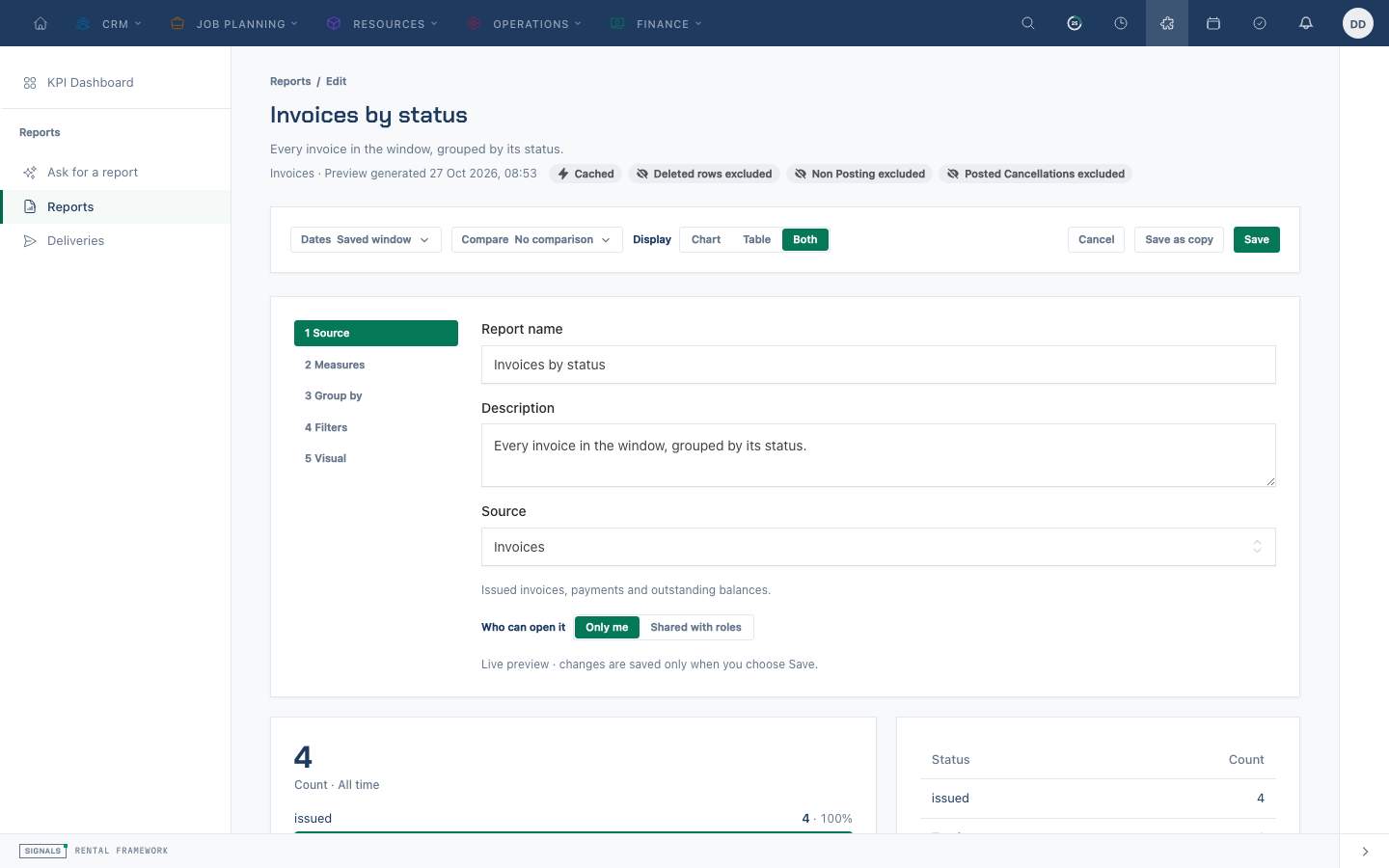
The sidebar opens KPI Dashboard at /reports, Ask for a report at /reports/ask when available, the saved Reports list at /reports/list, and Deliveries at /reports/deliveries. The reader at /reports/view/{id} runs a visible report and offers inline editing; /reports/new opens the same editor for a new definition. The former /reports/builder route redirects to the new editor or the requested report in edit mode. System reports are read-only and may be cloned.
The editor's Source, Measures, Group by, Filters and Visual steps shape a definition and show a live preview. A normal measure can carry its own filters, using the same whitelist as global filters; a named composite aggregation rejects inline filters. Preview runs as the current user and is not recorded as a saved-report run. Check the displayed row limit and truncation evidence before treating a preview as complete. The list groups visible reports by folder, displays optional category labels, and supports search, folder, source and visual filters and personal pins. The save sheet records name, description, folder, category and personal or shared visibility; it can create a folder and save a new report, changes, or a copy. Shared audiences can include roles, individual users, or both. Share & deliver on a saved report manages sharing, schedules and public snapshots.
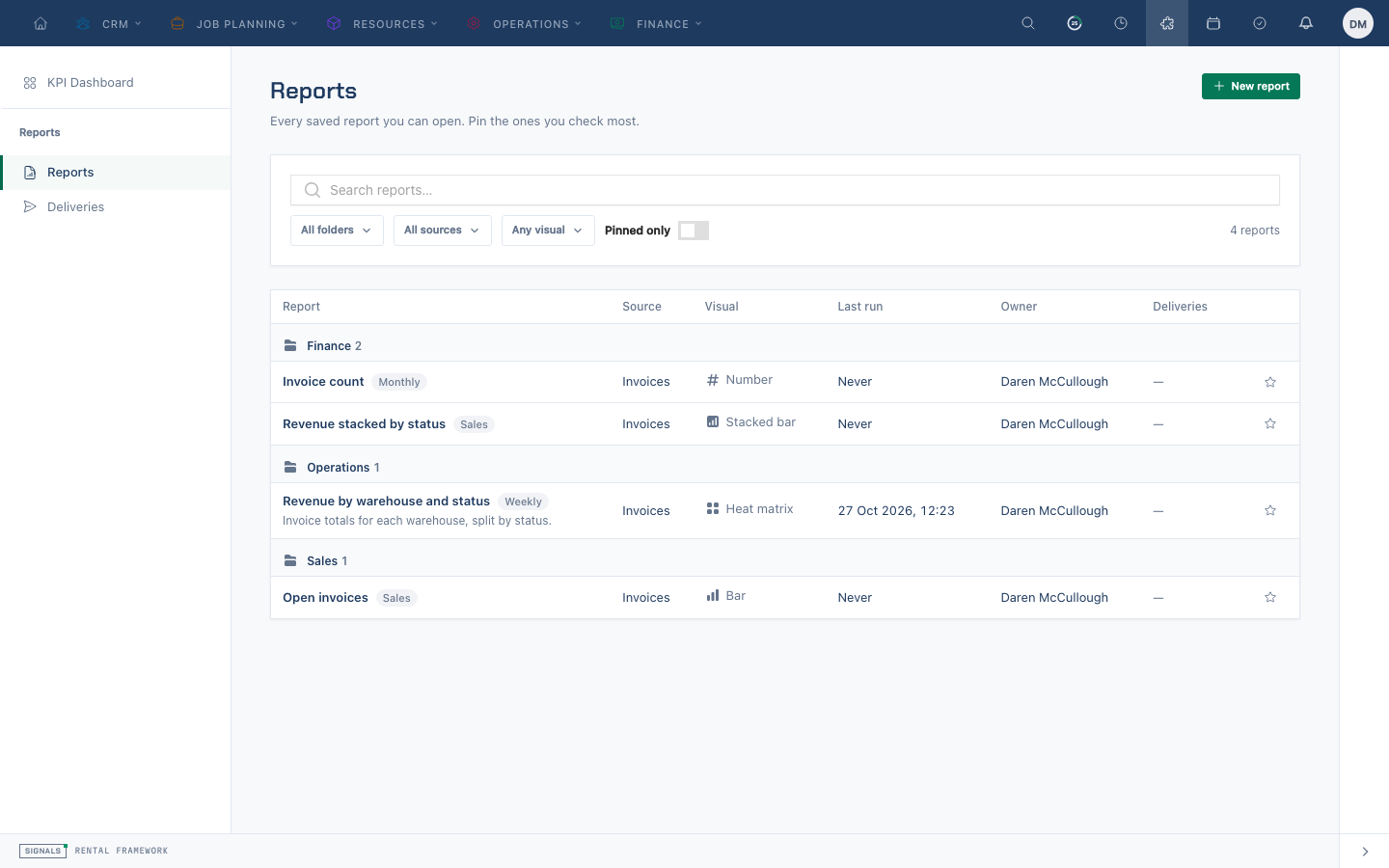
Visuals include table, bar, stacked bar, line, pie, doughnut, heat matrix and number. A heat matrix needs two dimensions and a measure; stacked bar uses the second dimension for stacks; number displays the first measure total.
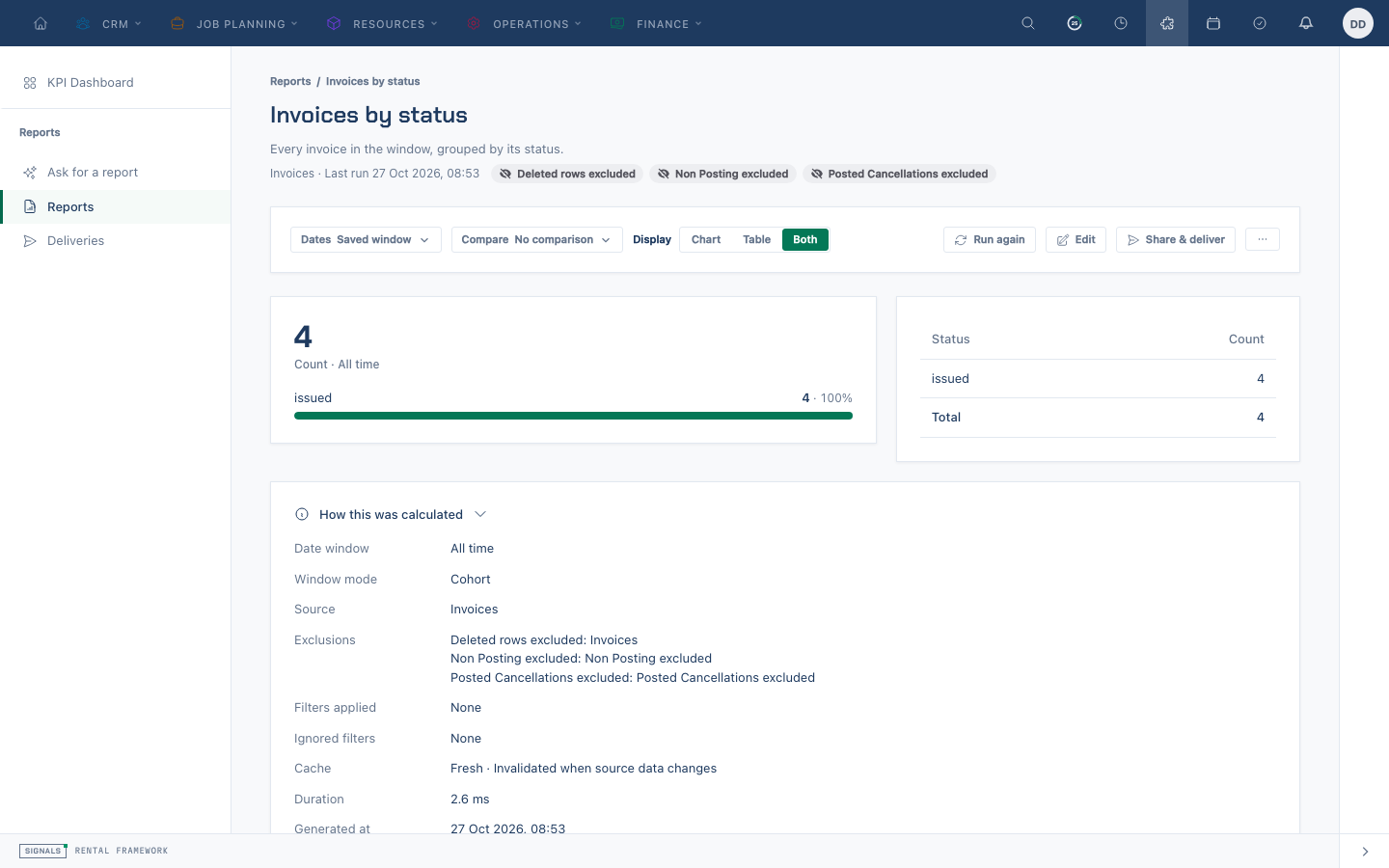
The reader’s Recent runs panel shows up to five deliberate saved-report runs with actor and time to viewers allowed to see the action log. Ad-hoc previews and ambient board or widget runs do not add entries.
Ask for a report
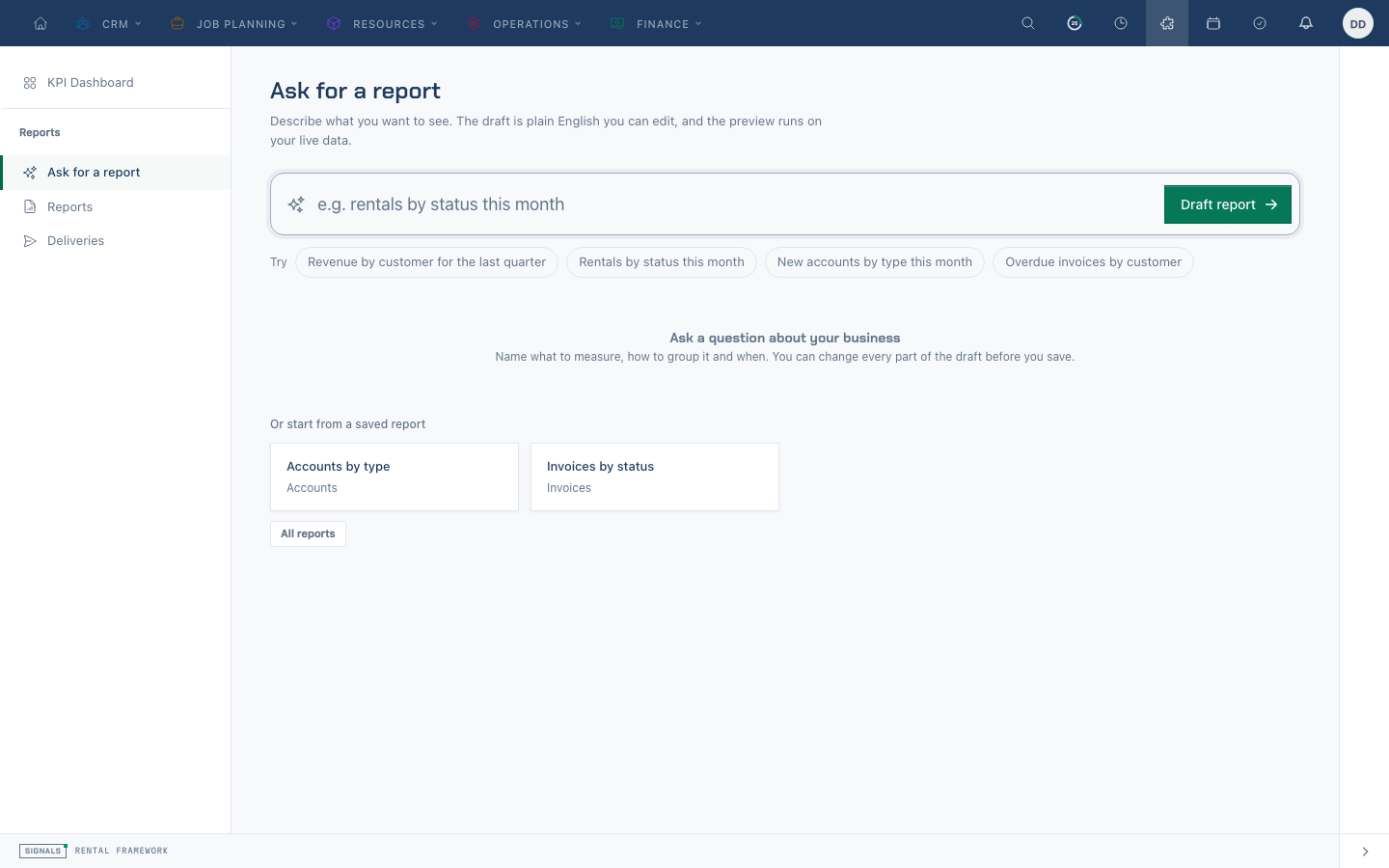
Ask sends the question and the permitted source and field metadata to the configured text AI provider, never report rows or totals. The returned structured draft is validated against the allowed sources and fields; its preview runs locally under the asking user's permissions. Questions can themselves contain sensitive text, so users should avoid putting it in a prompt. The report.asked audit event records question length and source, not the question. Token usage is recorded in the AI usage log under reports.ask.
Ask is configured by an administrator: the AI (text) provider and keys, the per-user hourly limit, the monthly token budget and the owner acknowledgement are described in Admin → Reports. Ask is hidden when it is disabled, unconfigured, unacknowledged or unauthorized; a rate or budget pause remains visible with an explanation.
Visibility and sharing
| Visibility | Who sees it |
|---|---|
| System | Everyone. Shipped with the framework or by a plugin, and cannot be deleted — a system report can be re-seeded, but the saved widgets and schedules pointing at it cannot. |
| Personal | Only its owner. |
| Shared | The specific users and roles it is shared with. |
Sharing uses the same assignment primitive as shared list views, so the same people and roles are offered in both places.
Sharing a report shares the definition, not the data. Everyone who opens it runs it under their own permissions: warehouse scoping is reapplied per viewer, and a viewer with no accessible warehouses gets an empty result rather than someone else's totals.
Rental Phases source
Choose Rental Phases (rental_phases) for one row per attached rental phase. Fields include rental reference, phase key, start/end instants and sequence. Definition dimensions and filters include definition.key, definition.label, definition.blocks_availability and definition.operational_role. Rental filters include state, status, customer, warehouse and hire dates.
The default date cohort uses rental.starts_at, allowing partially dated phases to stay in a rental's cohort. Filter phase starts_at/ends_at or use an explicit overlap window to select phase intervals. Hidden and archived definitions remain reportable when attached. Definition labels, blocking and roles reflect current configuration; issued document snapshots retain their own captured values.
Source access requires rentals.view as well as the relevant reporting permissions. Rows follow the viewer's rental warehouse access and exclude deleted parent rentals. Export report results through the report export flow, or select the rental_phases model source for individual phase rows in Exports.
Exports
Any result can be exported as CSV, XLSX, or PDF with reports.export. Exports run through the standard export-job pipeline, so a large export is queued and appears under Export jobs with progress and a download link; small ones return a link immediately. PDFs render landscape A4 through the configured PDF driver.
An export runs through the same permission gates as the screen, so it cannot contain a row the exporter could not access.
Public snapshot links
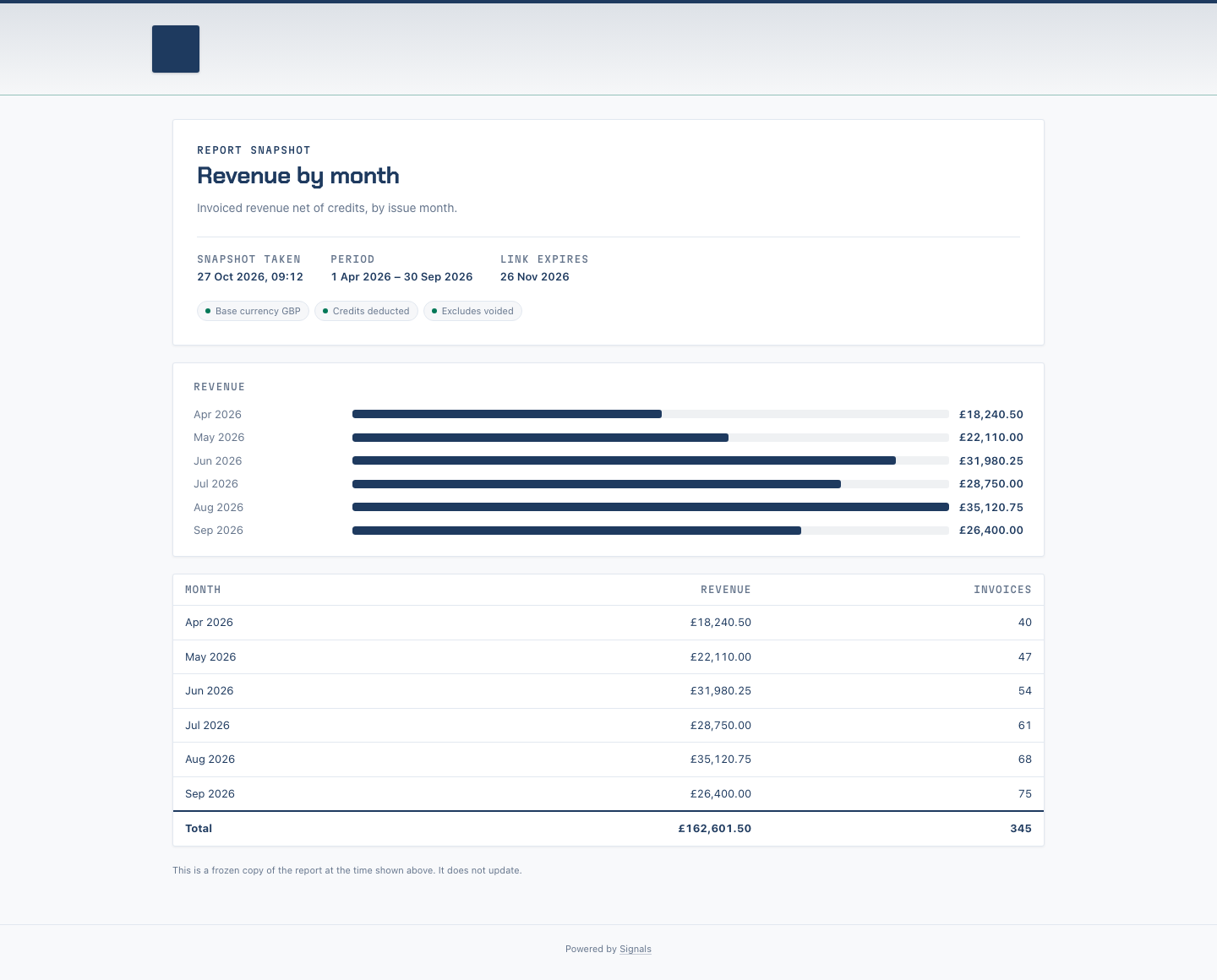
A user with reports.export and access to the report and source can create a public link from Share & deliver. Creation runs the report once as that named user and freezes the result; /r/{token} serves that snapshot without a sign-in, not a live report. Expiry is mandatory, defaults to 30 days and accepts 1–90 days. An optional PIN protects the link. The URL is returned only when created; subsequent listings expose metadata, including view count and last view, but not the token, PIN or snapshot rows. Revocation stops access immediately. Treat the link as access to the creator's frozen data and share a PIN separately.
Scheduled delivery
A saved report can carry one or more schedules that run it unattended and email the result to subscribers.
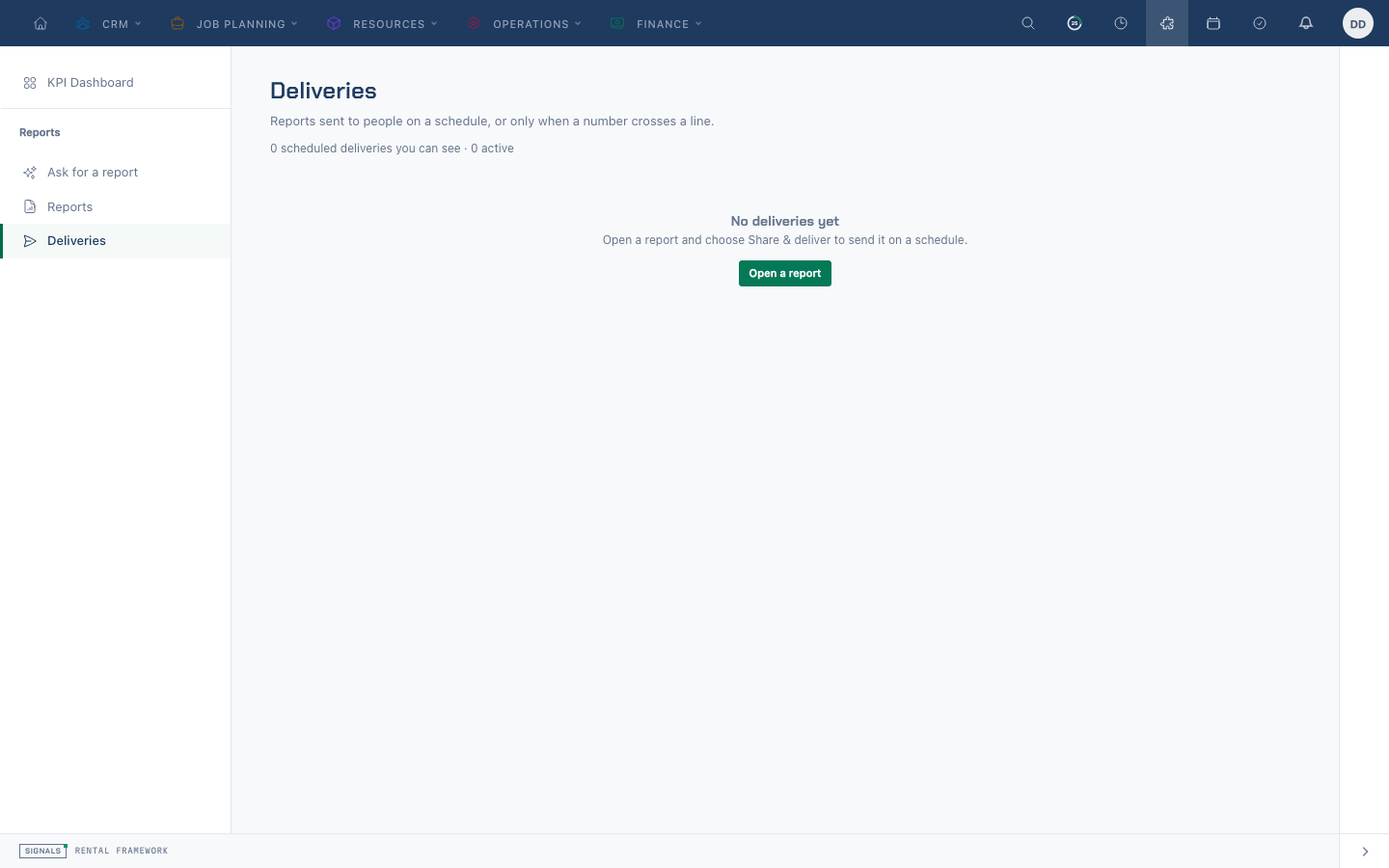
A schedule sets:
- Frequency — daily, weekly (with a day of the week), monthly, or quarterly (with a day of the month). A day of the month beyond the length of a short month still fires, clamped to the last day.
- Send time and timezone — local to the schedule, defaulting to the company timezone.
- Format — the attachment format, PDF by default.
- Active — schedules can be disarmed without being deleted.
Due schedules are picked up every few minutes by the scheduled task signals:dispatch-report-schedules, which advances the schedule before the run so a slow report never causes a double send. Delivery runs on the exports queue and will not overlap itself.
Subscribers
A subscriber is either an internal user or an external email address.
- Internal subscribers each get their own run, executed under their own permissions. A subscriber who has since lost access to the report or its source is skipped and recorded, rather than being sent data they can no longer see, and rather than failing the whole delivery.
- External subscribers receive the report as rendered under the schedule owner's permissions — worth remembering before adding an address outside the business.
Each delivery sends the report.scheduled_delivery notification with the rendered file attached, and emits the report.generated webhook recording what was delivered, who was skipped, and which thresholds tripped. See Webhooks for the payload.
Thresholds
A schedule can carry thresholds — simple rules of the form measure, comparator, value, using a fixed set of comparators: equals, does not equal, greater than, greater than or equal to, less than, and less than or equal to. Thresholds are configuration, never expressions, so nothing entered here is evaluated as code.
When a threshold trips, the recipients get an additional report.threshold_alert notification naming the measure, the rule, and the actual figure. A breach adds an alert; it never suppresses or gates the normal delivery.
Thresholds are evaluated once, on the schedule owner's run. Evaluating them per subscriber would make the same rule fire or not fire depending on who happened to be on the distribution list.
VAT-return reports
The shipped VAT Return and Tax by Treatment reports use net_tax_facts: signed frozen tax snapshots, never a recalculation with today's rates. The source combines posted invoice tax rows with effective credit-note tax rows. This describes executable reporting, not a new legal tax-point policy.
| Fact | View eligibility and sign | Period |
|---|---|---|
| Invoice | is_posting = true, non-null issued_at, status other than Draft; effect_sign = 1; frozen signed amounts are preserved |
Invoice issued_at |
| Credit note | Issued or Applied, not soft-deleted, linked to a qualifying posted invoice; effect_sign = -1; frozen reversal amounts are already signed |
Each credit tax row's frozen tax_point_at |
Draft and non-posting invoice facts do not enter this source. Draft or Void credits do not enter it. A credited invoice keeps its original signed fact; the effective credit contributes its own already-signed reversal. Negative original tax components can therefore have positive reversal components. Do not multiply a stored signed amount by effect_sign again. Within the same currency and period, invoice tax 200 plus credit tax -50 nets to 150 minor units. An undated effective credit remains evidence with date_complete = false; it is not silently assigned the original invoice date.
VAT Return groups by document currency, rate name and percentage for last_quarter; Tax by Treatment groups by document currency and treatment for this_year. Both window on tax_point_at, keep currency first, and disable grand totals and totals rows. Do not add GBP and EUR minors or treat a currency partition as a converted base total.
Gross-tax reports and export exceptions
The invoice_taxes source remains a gross invoice-only source; it does not net credit notes. Its export is refused while effective Issued or Applied credits exist in the named viewer's warehouse scope, including retained soft-deleted credits. A gross on-screen result is not a net VAT return.
Tax-report repair by ReportSeeder requires an exact match to a recognized, unmodified system VAT Return or Tax by Treatment definition, including its name, description, ownership and visibility. Customized or otherwise changed reports remain untouched for review; rerunning the seeder does not guarantee that every saved tax report uses net_tax_facts.
Net-tax export checks the named viewer's visible warehouse evidence, not just rows inside the selected report period. Readiness checks posted Standard invoices and effective credits linked to posting invoices other than Deposit/Proforma (or with no invoice). It refuses posted Standard invoice voids without cancellation evidence with frozen tax rows, missing tax points, non-reconciling or overflowing frozen tax totals, missing or inconsistent credit invoice/warehouse/currency linkage, retained effective credits omitted from the view, and mismatched original tax provenance. Unresolved canonical currency or original monetary precision also refuses export. A posted Void invoice is not silently removed as a cancellation: its unresolved dated cancellation evidence blocks export.
Reconcile before using a result
- Record the report key/source, actual saved definition, date window, viewer and warehouse scope. Check grouping, filters and row limits; a customized or truncated result is not evidence of completeness.
- For each currency, reconcile invoice and effective-credit document IDs and frozen tax-row IDs to signed taxable and tax totals, grouped by the report's rate or treatment. Use each fact's own tax point; do not move a later credit into the invoice period.
- Investigate any export refusal against retained invoice, credit and original tax provenance. Preserve the exception and evidence; do not fabricate a date, remove a credit, change a posted status or recalculate original tax to make export succeed.
- Correct the authoritative source through its permitted finance process, then rerun the same scoped definition and compare the delta. Export success alone does not certify legal filing policy or every external reconciliation.
System reports
Thirty-four reports ship with the framework and are available to everyone with reporting access — subject to the source's own permission, so someone who cannot see rentals does not see the rental reports:
| Report | Source | Category |
|---|---|---|
| Revenue by Warehouse | Invoices | Finance |
| Outstanding Invoices | Invoices | Finance |
| VAT Return | Net Tax Facts | Finance |
| Tax by Treatment | Net Tax Facts | Finance |
| Invoiced Revenue by Month | Invoices | Finance |
| Payments Received by Month | Invoice payments | Finance |
| Revenue by Currency | Invoices | Finance |
| Revenue by Catalogue Item | Invoice items | Sales |
| Revenue by Catalogue Item Group | Invoice items | Sales |
| Top Clients | Invoices | Sales |
| Pipeline by Stage | Rentals | Sales |
| Rental Turnover by Warehouse | Rentals | Operations |
| Rental Revenue by Month | Rentals | Sales |
| Revenue Mix by Warehouse | Rentals | Sales |
| Upcoming Shortages | Rentals | Operations |
| Uninvoiced Orders | Rentals | Finance |
| Aged Receivables | Invoices | Finance |
| Credit Notes by Status | Credit notes | Finance |
| Supplier Spend | Purchase orders | Purchasing |
| Fleet by Warehouse | Assets | Operations |
| Equipment Test Outcomes | Equipment test results | Maintenance |
| Repairs by Status | Repairs | Maintenance |
| New Accounts by Type | Accounts | Accounts |
| Catalogue Composition | Catalogue items | Catalogue |
| KPI Revenue | Net invoice revenue | Finance |
| KPI Average Order Value | Rentals | Sales |
| KPI Subhire Cost | Purchase orders | Purchasing |
| KPI Invoice Size | Invoices | Finance |
| KPI Asset Base | Assets | Operations |
| KPI Conversion Rate | Rentals | Sales |
| KPI Forward Order Book | Rentals | Sales |
| KPI Lost Rental Value | Rentals | Sales |
| KPI Active Customers | Invoices | Sales |
| KPI Top-ten Revenue | Invoices | Sales |
A deleted or edited system report is restored the next time the report seeder runs — see Admin → Reports.
API
Reports are available over the REST API under /api/v1/reports. Reading and running need the reports:read ability; creating, editing, deleting, and managing schedules need reports:write. The caller's permissions and warehouse scoping apply exactly as they do in the UI.
| Endpoint | Purpose | Ability |
|---|---|---|
GET /api/v1/reports |
List saved reports, paginated and filterable by key, name, source, category, and visibility |
reports:read |
GET /api/v1/reports/{report} |
Fetch one report definition, including category, folder and share assignments | reports:read |
GET /api/v1/reports/{report}/runs |
List up to five recent deliberate runs of a visible report | reports:read |
POST /api/v1/reports |
Save a report | reports:write |
PUT/PATCH /api/v1/reports/{report} |
Update a report | reports:write |
DELETE /api/v1/reports/{report} |
Delete a report | reports:write |
POST /api/v1/reports/{report}/execute |
Run a saved report, optionally with overrides | reports:read |
POST /api/v1/reports/execute |
Run an ad-hoc definition without saving it | reports:read |
GET/POST/PUT/DELETE /api/v1/reports/{report}/schedules |
Manage a report's schedules | reports:read / reports:write |
GET /api/v1/report-folders |
List folder names from visible reports, including the default folder | reports:read |
GET /api/v1/report-sources |
Describe reportable sources and fields | reports:read |
POST /api/v1/reports/ask |
Draft an unsaved definition from a question | reports:ask |
POST/DELETE /api/v1/reports/{report}/pin |
Pin or unpin personally | reports:write |
POST /api/v1/reports/{report}/drill |
Read underlying records for a report cell | reports:read |
GET /api/v1/report-boards |
List visible boards | reports:read |
POST /api/v1/report-boards/{board}/run |
Run a board | reports:read |
GET/POST /api/v1/reports/{report}/public-links |
List metadata or create a snapshot link | reports:read / reports:write |
DELETE /api/v1/report-public-links/{link} |
Revoke a snapshot link | reports:write |
Report create and update accept category, folder, visibility, role_ids and user_ids; show returns these fields and the share assignments. Choose the intended roles or users for a shared audience; newly assigned users must belong to the tenant. Recent runs require visibility of the report and reports.view; without action-log access the endpoint returns an empty list. It returns run ID, time, user ID and actor, not audit metadata or IP addresses.
Token abilities supplement user permissions and source access. Snapshot creation requires reports.export; its creator can revoke their own link even after losing access. Ask also requires reports.ask and reports.view. The curated MCP equivalents are list-report-folders, list-report-runs, ask-for-report, pin-report, unpin-report, list-report-boards, run-report-board, drill-report-rows, list-report-public-links, create-report-public-link, and revoke-report-public-link. MCP snapshot creation requires explicit confirmation of public exposure.
Scheduling a report board
A schedule points at exactly one subject: a saved report, or a registered report board such as the KPI dashboard. A board has a registry key rather than a Report row, so it has nothing to nest under — which is why schedules are also addressable on their own, by schedule id alone.
| Endpoint | Purpose | Ability |
|---|---|---|
GET /api/v1/report_schedules |
List every schedule whose subject you can see, reports and boards alike | reports:read |
GET /api/v1/report_schedules/{schedule} |
Fetch one schedule by id, whatever its subject | reports:read |
POST /api/v1/report_schedules |
Schedule a report (report_id) or a board (board_key) — exactly one of the two |
reports:write |
PUT/PATCH /api/v1/report_schedules/{schedule} |
Update a schedule by id | reports:write |
DELETE /api/v1/report_schedules/{schedule} |
Delete a schedule and its subscriber rows | reports:write |
The subject is fixed once set. A matching report_id or board_key may be sent back unchanged, but a differing one is refused rather than quietly repointing an existing delivery at another report.
Visibility is the subject's own: a report schedule follows the report's visibility rule, and a board schedule follows that board's view gate. The nested /api/v1/reports/{report}/schedules routes remain, and are the natural way to work with one report's schedules.
Execution accepts overrides (any part of the definition — dimensions, measures, date window, filters, limit), comparison, warehouse_ids (intersected with what the caller may see, never widened), and fresh to bypass the cache. The response places the report result in data: data.columns, data.rows, data.subtotals, data.totals, and data.meta. This report-specific metadata describes the dimensions, measures, resolved date range, comparison window, currency, row count, whether the result was truncated, whether it came from cache, and how long it took. Any response-level metadata remains in root meta.
Filtering, pagination (page, per_page), and the filter[field][operator]=value query syntax follow the usual API conventions.
Notes
- Results are cached per definition and per permission context, so a cached result is never served to someone whose access differs. Closed historical windows cache for a day; windows that are still open cache for five minutes, and are invalidated when relevant records change.
- Cost fields are refused outright to roles without cost visibility rather than blanked, so a total is never quietly wrong.
- Invalid filters are rejected with a coded
422before the report query runs.
Account integration contracts
For account capabilities, canonical IDs, version conflicts and credit/privacy refusals, use the installed account integration contracts. Each transport keeps its own authority and response shape; this guide does not authorize held operations.
A report schedule reason accepts up to 500 characters in REST commands, MCP tools, and the delivery editor.